
← 返回到所有服务
GitHub 仓库信息
获取时间 · 2026年9月15日★ 9,692最新版本: 2.3.3最后更新: 2026年9月14日
README
Miniflux 2
==========
Miniflux is a minimalist and opinionated feed reader.
It's simple, fast, lightweight and super easy to install.
Official website: <https://miniflux.app>
Features
--------
### Feed Reader
- Supported feed formats: Atom 0.3/1.0, RSS 1.0/2.0, and JSON Feed 1.0/1.1.
- [OPML](https://en.wikipedia.org/wiki/OPML) file import/export and URL import.
- Supports multiple attachments (podcasts, videos, music, and images enclosures).
- Plays videos from YouTube directly inside Miniflux.
- Organizes articles using categories and bookmarks.
- Share individual articles publicly.
- Fetches website icons (favicons).
- Saves articles to third-party services.
- Provides full-text search (powered by Postgres).
- Available in 20 languages: Portuguese (Brazilian), Chinese (Simplified and Traditional), Dutch, English (US), Finnish, French, German, Greek, Hindi, Indonesian, Italian, Japanese, Polish, Romanian, Russian, Taiwanese POJ, Ukrainian, Spanish, and Turkish.
### Privacy and Security
- Removes pixel trackers.
- Strips tracking parameters from URLs (e.g., `utm_source`, `utm_medium`, `utm_campaign`, `fbclid`, etc.).
- Retrieves original links when feeds are sourced from FeedBurner.
- Opens external links with attributes `rel="noopener noreferrer" referrerpolicy="no-referrer"` for improved security.
- Implements the HTTP header `Referrer-Policy: no-referrer` to prevent referrer leakage.
- Provides a media proxy to avoid tracking and resolve mixed content warnings when using HTTPS.
- Plays YouTube videos via the privacy-focused domain `youtube-nocookie.com`.
- Supports alternative YouTube video players such as [Invidious](https://invidio.us).
- Blocks external JavaScript to prevent tracking and enhance security.
- Sanitizes external content before rendering it.
- Enforces a [Content Security](https://developer.mozilla.org/en-US/docs/Web/HTTP/CSP) and a [Trusted Types Policy](https://developer.mozilla.org/en-US/docs/Web/API/Trusted_Types_API) to only application JavaScript and blocks inline scripts and styles.
### Bot Protection Bypass Mechanisms
- Optionally disable HTTP/2 to mitigate fingerprinting.
- Allows configuration of a custom user agent.
- Supports adding custom cookies for specific use cases.
- Enables the use of proxies for enhanced privacy or bypassing restrictions.
### Content Manipulation
- Fetches the original article and extracts only the relevant content using a local Readability parser.
- Allows custom scraper rules based on <abbr title="Cascading Style Sheets">CSS</abbr> selectors.
- Supports custom rewriting rules for content manipulation.
- Provides a regex filter to include or exclude articles based on specific patterns.
- Optionally permits self-signed or invalid certificates (disabled by default).
- Scrapes YouTube's website to retrieve video duration as read time or uses the YouTube API (disabled by default).
### User Interface
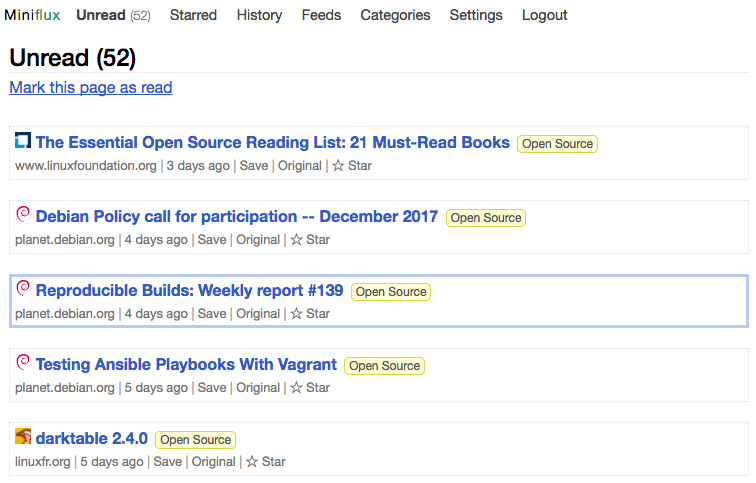
- Optimized stylesheet for readability.
- Responsive design that adapts seamlessly to desktop, tablet, and mobile devices.
- Minimalistic and distraction-free user interface.
- No requirement to download an app from Apple App Store or Google Play Store.
- Can be added directly to the home screen for quick access.
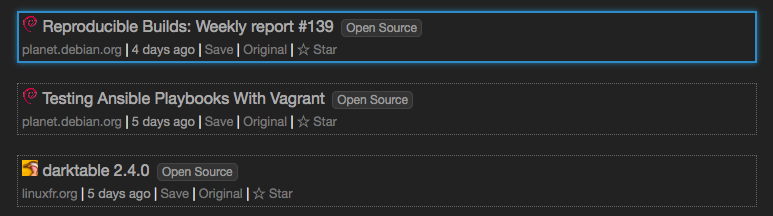
- Supports a wide range of keyboard shortcuts for efficient navigation.
- Optional touch gesture support for navigation on mobile devices.
- Custom stylesheets and JavaScript to personalize the user interface to your preferences.
- Themes:
- Light (Sans-Serif)
- Light (Serif)
- Dark (Sans-Serif)
- Dark (Serif)
- System (Sans-Serif) – Automatically switches between Dark and Light themes based on system preferences.
- System (Serif)
### Integrations
- 25+ integrations with third-party services: [Apprise](https://github.com/caronc/apprise), [Betula](https://sr.ht/~bouncepaw/betula/), [Cubox](https://cubox.cc/), [Discord](https://discord.com/), [Espial](https://github.com/jonschoning/espial), [Instapaper](https://www.instapaper.com/), [LinkAce](https://www.linkace.org/), [Linkding](https://github.com/sissbruecker/linkding), [LinkTaco](https://linktaco.com), [LinkWarden](https://linkwarden.app/), [Matrix](https://matrix.org), [Notion](https://www.notion.com/), [Ntfy](https://ntfy.sh/), [Nunux Keeper](https://keeper.nunux.org/), [Pinboard](https://pinboard.in/), [Pushover](https://pushover.net), [RainDrop](https://raindrop.io/), [Readeck](https://readeck.org/en/), [Readwise Reader](https://readwise.io/read), [RssBridge](https://rss-bridge.org/), [Shaarli](https://github.com/shaarli/Shaarli), [Shiori](https://github.com/go-shiori/shiori), [Slack](https://slack.com/), [Telegram](https://telegram.org), [Wallabag](https://www.wallabag.org/), etc.
- Bookmarklet for subscribing to websites directly from any web browser.
- Webhooks for real-time notifications or custom integrations.
- Compatibility with existing mobile applications using the Fever or Google Reader API.
- REST API with client libraries available in [Go](https://github.com/miniflux/v2/tree/main/client) and [Python](https://github.com/miniflux/python-client).
### Authentication
- Local username and password.
- Passkeys ([WebAuthn](https://en.wikipedia.org/wiki/WebAuthn)).
- Google (OAuth2).
- Generic OpenID Connect.
- Reverse-Proxy authentication.
### Technical Stuff
- Written in [Go (Golang)](https://golang.org/).
- Single binary compiled statically without dependency.
- Works only with [PostgreSQL](https://www.postgresql.org/).
- Does not use any ORM or any complicated frameworks.
- Uses modern vanilla JavaScript only when necessary.
- All static files are bundled into the application binary using the Go `embed` package.
- Supports the Systemd `sd_notify` protocol for process monitoring.
- Configures HTTPS automatically with Let's Encrypt.
- Allows the use of custom <abbr title="Secure Sockets Layer">SSL</abbr> certificates.
- Supports [HTTP/2](https://en.wikipedia.org/wiki/HTTP/2) when TLS is enabled.
- Updates feeds in the background using an internal scheduler or a traditional cron job.
- Uses native lazy loading for images and iframes.
- Compatible only with modern browsers.
- Adheres to the [Twelve-Factor App](https://12factor.net/) methodology.
- Provides official Debian/RPM packages and pre-built binaries.
- Publishes a Docker image to Docker Hub, GitHub Registry, and Quay.io Registry, with ARM and RISC-V architecture support.
- Uses a limited amount of third-party go dependencies
- Has a comprehensive testsuite, with both unit tests and integration tests.
- Only uses a couple of MB of memory and a negligible amount of CPU, even with several hundreds of feeds.
- Respects/sends Last-Modified, If-Modified-Since, If-None-Match, Cache-Control, Expires and ETags headers, and has a default polling interval of 1h.
Documentation
-------------
The Miniflux documentation is available here: <https://miniflux.app/docs/> ([Man page](https://miniflux.app/miniflux.1.html))
- [Opinionated?](https://miniflux.app/opinionated.html)
- [Features](https://miniflux.app/features.html)
- [Requirements](https://miniflux.app/docs/requirements.html)
- [Installation Instructions](https://miniflux.app/docs/installation.html)
- [Upgrading to a New Version](https://miniflux.app/docs/upgrade.html)
- [Configuration](https://miniflux.app/docs/configuration.html)
- [Command Line Usage](https://miniflux.app/docs/cli.html)
- [User Interface Usage](https://miniflux.app/docs/ui.html)
- [Keyboard Shortcuts](https://miniflux.app/docs/keyboard_shortcuts.html)
- [Integration with External Services](https://miniflux.app/docs/#integrations)
- [Rewrite and Scraper Rules](https://miniflux.app/docs/rules.html)
- [API Reference](https://miniflux.app/docs/api.html)
- [Development](https://miniflux.app/docs/development.html)
- [Internationalization](https://miniflux.app/docs/i18n.html)
- [Frequently Asked Questions](https://miniflux.app/faq.html)
Screenshots
-----------
Default theme:
Dark theme when using keyboard navigation:
Credits
-------
- Authors: Frédéric Guillot - [List of contributors](https://github.com/miniflux/v2/graphs/contributors)
- Distributed under Apache 2.0 License
Miniflux 是一个极简的自托管 RSS 阅读器,专注于简洁性、速度和效率。它提供了一个干净的阅读体验,没有杂乱的界面和不必要的功能,同时支持所有核心 RSS 阅读功能。
主要功能
- Feed 管理:添加、组织和管理多个 RSS/Atom 源
- 阅读视图:提供原始和阅读模式视图
- 自动发现:自动发现网站的 Feed 链接
- 键盘快捷键:高效的键盘导航
- 筛选和分类:通过分类、状态等筛选内容
- 全文获取:从摘要 Feed 中获取完整文章内容
- OPML 导入/导出:轻松迁移 Feed 集合
- 书签支持:集成 Instapaper、Pinboard、Pocket 等服务
- API 支持:完整的 REST API
- 多语言支持:界面支持多种语言
部署要求
- PostgreSQL 数据库
- 支持 Docker 或二进制部署
- 最低配置:0.5核 CPU,128MB 内存
- 推荐配置:1核 CPU,256MB 内存
- 存储空间:约 50MB(不包括数据库数据)
- 可选的外部服务:Fever API(用于移动应用集成)