
← 返回到所有服务
GitHub 仓库信息
获取时间 · 2026年9月15日★ 3,618最新版本: 7.3.2最后更新: 2026年9月14日
README
# CommaFeed
Google Reader inspired self-hosted RSS reader, based on Quarkus and React/TypeScript.
## Features
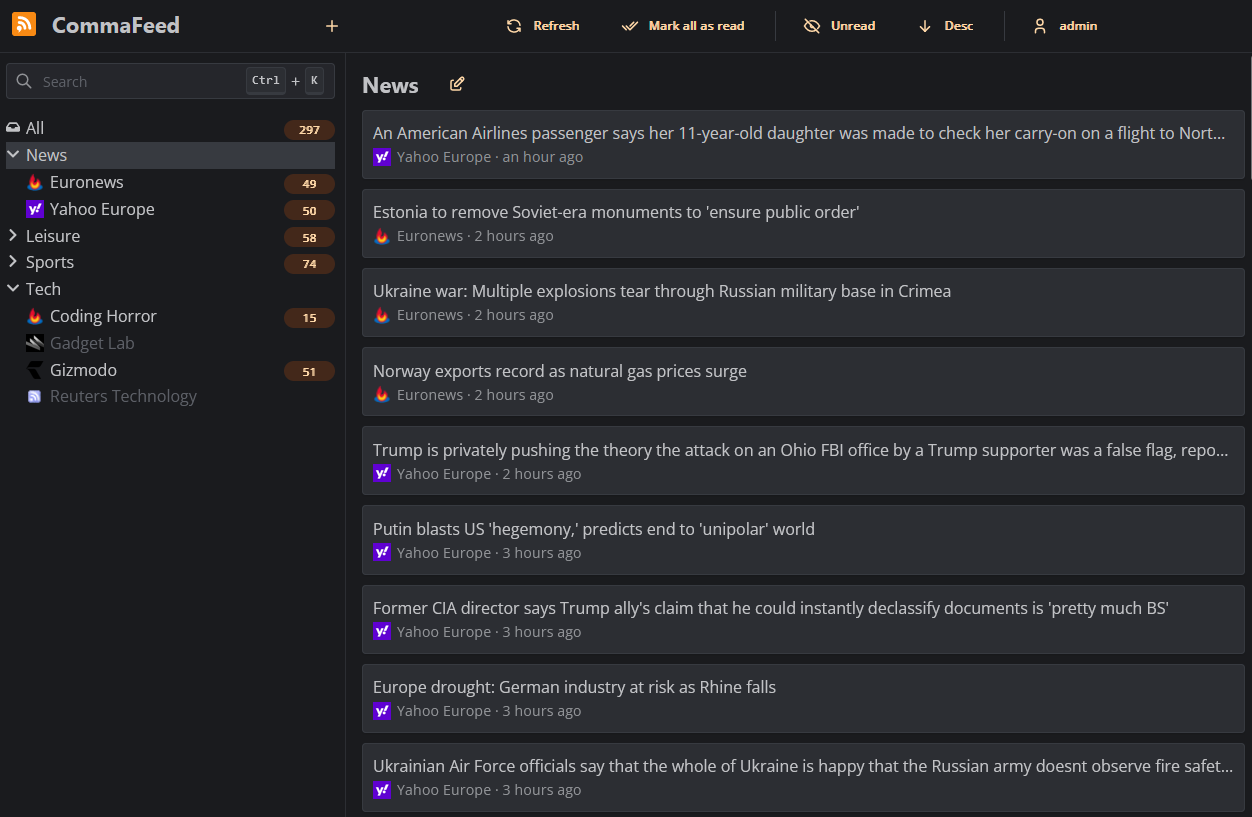
- 4 different layouts
- Light/Dark theme
- Fully responsive, works great on both mobile and desktop
- Keyboard shortcuts for almost everything
- Support for right-to-left feeds
- Translated in 25+ languages
- Supports thousands of users and millions of feeds
- OPML import/export
- REST API
- Fever and Google Reader API for native mobile apps
- Can automatically mark articles as read based on user-defined rules
- Push notifications when new articles are published
- Highly customizable with [custom CSS](https://athou.github.io/commafeed/documentation/custom-css) and JavaScript
- [Browser extension](https://github.com/Athou/commafeed-browser-extension)
- Compiles to native code for blazing fast startup and low memory usage
- Supports 4 databases
- H2 (embedded database)
- PostgreSQL
- MySQL
- MariaDB
## Usage
### Public instance
A free public instance is available at https://www.commafeed.com.
It has no ads, no tracking, and your data is never exploited or sold to third parties. The service is funded entirely through donations.
However, this public instance does have a few limitations compared to self-hosted setups, outlined [here](https://github.com/Athou/commafeed/discussions/1567).
### Docker
Docker is the easiest way to get started with self-hosted CommaFeed.
Docker images are built automatically and are available at https://hub.docker.com/r/athou/commafeed
### Cloud hosting
[PikaPods](https://www.pikapods.com) offers 1-click cloud hosting solutions starting at $1/month with a free $5
welcome credit and officially supports CommaFeed.
PikaPods shares 20% of the revenue back to CommaFeed.
[](https://www.pikapods.com/pods?run=commafeed)
### Download a precompiled package
Go to the [release page](https://github.com/Athou/commafeed/releases) and download the latest version for your operating
system and database of choice.
There are two types of packages:
- The `linux-x86_64`, `linux-aarch_64` and `windows-x86_64` packages are compiled natively and contain an executable that can be run
directly.
- The `jvm` package is a zip file containing all `.jar` files required to run the application. This package works on all
platforms but requires a JRE and is started with `java -jar quarkus-run.jar`.
If available for your operating system, the native package is recommended because it has a faster startup time and lower
memory usage.
### Build from sources
./mvnw clean package [-P<database> [-Pnative]] [-DskipTests]
- `<database>` can be one of `h2`, `postgresql`, `mysql` or `mariadb`. The default is `h2`.
- `-Pnative` compiles the application to native code. This requires either GraalVM to be installed (`GRAALVM_HOME` environment
variable pointing to a GraalVM installation) or a container environment to be available (docker/podman/...).
- `-DskipTests` to speed up the build process by skipping tests.
When the build is complete:
- a zip containing all jars required to run the application is located at
`commafeed-server/target/commafeed-<version>-<database>-jvm.zip`. Extract it and run the application with
`java -jar quarkus-run.jar`
- if you used the native profile, the executable is located at
`commafeed-server/target/commafeed-<version>-<database>-<platform>-<arch>-runner[.exe]`
### Distribution packages
- Arch Linux users can use [the CommaFeed package on AUR](https://aur.archlinux.org/pkgbase/commafeed), which builds native binaries with GraalVM for all supported databases.
## Configuration
CommaFeed doesn't require any configuration to run with its embedded database (H2). The database file will be stored in
the `data` directory of the current directory.
To use a different database, you will need to configure the following properties:
- `quarkus.datasource.jdbc.url`
- e.g. for H2: `jdbc:h2:./data/db;DEFRAG_ALWAYS=TRUE`
- e.g. for PostgreSQL: `jdbc:postgresql://localhost:5432/commafeed`
- e.g. for MySQL:
`jdbc:mysql://localhost/commafeed?autoReconnect=true&failOverReadOnly=false&maxReconnects=20&rewriteBatchedStatements=true&timezone=UTC`
- e.g. for MariaDB:
`jdbc:mariadb://localhost/commafeed?autoReconnect=true&failOverReadOnly=false&maxReconnects=20&rewriteBatchedStatements=true&timezone=UTC`
- `quarkus.datasource.username`
- `quarkus.datasource.password`
There are multiple ways to configure CommaFeed:
- a `config/application.properties` [properties](https://en.wikipedia.org/wiki/.properties) file relative to the working
directory (keys in kebab-case)
- Command line arguments each prefixed with `-D` (keys in kebab-case)
- Environment variables (keys in UPPER_CASE)
- a `.env` file in the working directory (keys in UPPER_CASE)
When in doubt, the properties file is recommended because CommaFeed will be able to warn about invalid properties and typos.
All [CommaFeed settings](https://athou.github.io/commafeed/documentation) are optional and have sensible default values.
When logging in, credentials are stored in an encrypted cookie. The encryption key is randomly generated at startup,
meaning that you will have to log back in after each restart of the application. To prevent this, you can set the
`quarkus.http.auth.session.encryption-key` property to a fixed value (min. 16 characters).
All other Quarkus settings can be found [here](https://quarkus.io/guides/all-config).
When started, the server will listen on http://localhost:8082.
### Updates
When CommaFeed is up and running, you can subscribe to [this feed](https://github.com/Athou/commafeed/releases.atom) to be notified of new releases.
### Memory management
The Java Virtual Machine (JVM) is rather greedy by default and will not release unused memory to the
operating system. This is because acquiring memory from the operating system is a relatively expensive operation.
This can be problematic on systems with limited memory.
#### Hard limit (`native` and `jvm` packages)
The JVM can be configured to use a maximum amount of memory with the `-Xmx` parameter.
For example, to limit the JVM to 256MB of memory, use `-Xmx256m`.
#### Dynamic sizing (`jvm` package)
In addition to the previous setting, the JVM can be configured to release unused memory to the operating system with the
following parameters:
-Xms20m -XX:+UseG1GC -XX:+UseStringDeduplication -XX:-ShrinkHeapInSteps -XX:G1PeriodicGCInterval=10000 -XX:-G1PeriodicGCInvokesConcurrent -XX:MinHeapFreeRatio=5 -XX:MaxHeapFreeRatio=10
See [here](https://docs.oracle.com/en/java/javase/17/gctuning/garbage-first-g1-garbage-collector1.html)
and [here](https://docs.oracle.com/en/java/javase/17/gctuning/factors-affecting-garbage-collection-performance.html) for
more
information.
#### OpenJ9 (`jvm` package)
The [OpenJ9](https://eclipse.dev/openj9/) JVM is a more memory-efficient alternative to the HotSpot JVM, at the cost of
slightly slower throughput.
IBM provides precompiled binaries for OpenJ9
named [Semeru](https://developer.ibm.com/languages/java/semeru-runtimes/downloads/).
This is the JVM used in
the [Docker image](https://github.com/Athou/commafeed/blob/master/commafeed-server/src/main/docker/Dockerfile.jvm).
## FAQ
### Getting "Access to local address blocked" when adding a feed
CommaFeed blocks access to local resources by default to prevent [SSRF](https://en.wikipedia.org/wiki/Server-side_request_forgery) attacks.
If you want to subscribe to feeds that are only available on your local network, you can disable this security measure by setting the `commafeed.http-client.block-local-addresses` variable to `false`.
Do this only if you trust all users of your CommaFeed instance not to access private resources.
### Listen on a single network interface
By default, CommaFeed listens on all interfaces. You can restrict it by setting `quarkus.http.host`.
Note that if you set it to a local name like `127.0.0.1` host validation is enabled automatically. This prevents
access if you're using a reverse proxy like Nginx. To fix, add your actual hostname to `allowed-hosts`:
```
quarkus.http.host=127.0.0.1
quarkus.http.proxy.proxy-address-forwarding=true
quarkus.http.proxy.allow-forwarded=true
quarkus.http.host-validation.allowed-hosts=commafeed.example.com
```
## Translation
Files for internationalization are
located [here](https://github.com/Athou/commafeed/tree/master/commafeed-client/src/locales).
To add a new language:
- add the new locale to the `locales` array in:
- `commafeed-client/.linguirc`
- `commafeed-client/src/i18n.ts`
- run `npm run i18n:extract`
- add translations to the newly created `commafeed-client/src/locales/[locale]/messages.po` file
The name of the locale should be the
two-letters [ISO-639-1 language code](http://en.wikipedia.org/wiki/List_of_ISO_639-1_codes).
## Local development
### Backend
- Open `commafeed-server` in your preferred Java IDE.
- CommaFeed uses Lombok, you need the Lombok plugin for your IDE.
- run `./mvnw quarkus:dev`
### Frontend
- Open `commafeed-client` in your preferred JavaScript IDE.
- run `npm install`
- run `npm run dev`
The frontend server is now running at http://localhost:8082 and is proxying REST requests to the backend running on
port 8083
CommaFeed 是一个轻量级的自托管 RSS 阅读器,采用 Java 开发。它提供了类似 Google Reader 的简洁界面,适合个人使用。
主要功能
- 简洁界面:类似 Google Reader 的简洁界面
- 移动端支持:响应式设计,支持移动设备
- 导入导出:支持 OPML 导入导出
- 多用户:支持多用户系统
- 标签系统:支持文章标签管理
- 搜索功能:支持文章搜索
- 快捷键:提供键盘快捷键支持
- REST API:提供 API 接口
- 主题支持:支持自定义主题
部署要求
- Java 8+ 环境
- PostgreSQL 数据库
- 最低配置:1核 CPU,256MB 内存
- 推荐配置:2核 CPU,512MB 内存
- 存储空间:约 100MB(不包括数据库数据)