
← 返回到所有服务
GitHub 仓库信息
获取时间 · 2026年9月15日★ 15,019最新版本: v2.18.0最后更新: 2026年9月14日
README
<img src="https://github.com/documenso/documenso/assets/13398220/a643571f-0239-46a6-a73e-6bef38d1228b" alt="Documenso Logo">
<p align="center" style="margin-top: 20px">
<p align="center">
The Open Source DocuSign Alternative.
<br>
<a href="https://documenso.com"><strong>Learn more »</strong></a>
<br />
<br />
<a href="https://documen.so/discord">Discord</a>
·
<a href="https://documenso.com">Website</a>
·
<a href="https://docs.documenso.com">Documentation</a>
·
<a href="https://github.com/documenso/documenso/issues">Issues</a>
·
<a href="https://documen.so/live">Upcoming Releases</a>
·
<a href="https://documen.so/roadmap">Roadmap</a>
</p>
</p>
<p align="center">
<a href="https://documen.so/discord"><img src="https://img.shields.io/badge/Discord-documen.so/discord-%235865F2" alt="Join Documenso on Discord"></a>
<a href="https://github.com/documenso/documenso/stargazers"><img src="https://img.shields.io/github/stars/documenso/documenso" alt="Github Stars"></a>
<a href="https://github.com/documenso/documenso/blob/main/LICENSE"><img src="https://img.shields.io/badge/license-AGPLv3-purple" alt="License"></a>
<a href="https://github.com/documenso/documenso/pulse"><img src="https://img.shields.io/github/commit-activity/m/documenso/documenso" alt="Commits-per-month"></a>
<a href="https://vscode.dev/redirect?url=vscode://ms-vscode-remote.remote-containers/cloneInVolume?url=https://github.com/documenso/documenso">
<img alt="open in devcontainer" src="https://img.shields.io/static/v1?label=Dev%20Containers&message=Enabled&color=blue&logo=visualstudiocode" />
</a>
<a href="CODE_OF_CONDUCT.md"><img src="https://img.shields.io/badge/Contributor%20Covenant-2.1-4baaaa.svg" alt="Contributor Covenant"></a>
</p>
<div align="center">
<img src="https://github.com/documenso/documenso/assets/13398220/d96ed533-6f34-4a97-be9b-442bdb189c69" style="width: 80%;" />
</div>
## About Documenso
Signing documents digitally should be fast and easy and should be the best practice for every document signed worldwide. This is technically quite easy today, but it also introduces a new party to every signature: The signing tool providers. While this is not a problem in itself, it should make us think about how we want these providers of trust to work. Documenso aims to be the world's most trusted document-signing tool. This trust is built by empowering you to self-host Documenso and review how it works under the hood.
Join us in creating the next generation of open trust infrastructure.
## Recognition
<p align="center">
<a href="https://www.producthunt.com/posts/documenso?utm_source=badge-top-post-badge&utm_medium=badge&utm_souce=badge-documenso" target="_blank"><img src="https://api.producthunt.com/widgets/embed-image/v1/top-post-badge.svg?post_id=395047&theme=light&period=daily" alt="Documenso - The open source DocuSign alternative | Product Hunt" style="width: 250px; height: 54px;" width="250" height="54" /></a>
<a href="https://www.producthunt.com/posts/documenso?utm_source=badge-featured&utm_medium=badge&utm_souce=badge-documenso" target="_blank"><img src="https://api.producthunt.com/widgets/embed-image/v1/featured.svg?post_id=395047&theme=light" alt="Documenso - The Open Source DocuSign Alternative. | Product Hunt" style="width: 250px; height: 54px;" width="250" height="54" /></a>
</p>
## Community and Next Steps 🎯
- Try Documenso by self-hosting it or signing up at [documenso.com](https://documenso.com).
- Tell us what you think in the [Discussions](https://github.com/documenso/documenso/discussions).
- Join the [Discord server](https://documen.so/discord) for any questions and getting to know other community members.
- ⭐ the repository to help us raise awareness.
- Open detailed [issues](https://github.com/documenso/documenso/issues) to report bugs or propose features.
## Contributing
> **Note**: We no longer accept external pull requests, aside from a small group of trusted contributors we reach out to directly. The best way to contribute is through detailed issues. Read [Why We're Pausing External Pull Requests](https://documenso.com/blog/why-we-re-pausing-external-pull-requests) for the reasoning.
- Documenso stays open source. You can read, audit, run, and fork the code.
- To report issues or propose changes, see our [contribution guide](https://github.com/documenso/documenso/blob/main/CONTRIBUTING.md).
## Contact us
Contact us if you are interested in our Enterprise plan for large organizations that need extra flexibility and control.
<a href="https://cal.com/timurercan/enterprise-customers?utm_source=banner&utm_campaign=oss"><img alt="Book us with Cal.com" src="https://cal.com/book-with-cal-dark.svg" /></a>
## Tech Stack
<p align="left">
<a href="https://www.typescriptlang.org"><img src="https://shields.io/badge/TypeScript-3178C6?logo=TypeScript&logoColor=FFF&style=flat-square" alt="TypeScript"></a>
<a href="https://prisma.io"><img width="122" height="20" src="http://made-with.prisma.io/indigo.svg" alt="Made with Prisma" /></a>
<a href="https://tailwindcss.com/"><img src="https://img.shields.io/badge/tailwindcss-0F172A?&logo=tailwindcss" alt="Tailwind CSS"></a>
<a href=""><img src="" alt=""></a>
<a href=""><img src="" alt=""></a>
<a href=""><img src="" alt=""></a>
<a href=""><img src="" alt=""></a>
<a href=""><img src="" alt=""></a>
</p>
- [TypeScript](https://www.typescriptlang.org/) - Language
- [React Router v7](https://reactrouter.com/) - Framework
- [Hono](https://hono.dev/) - Server
- [Prisma](https://www.prisma.io/) - ORM
- [Tailwind CSS](https://tailwindcss.com/) - CSS
- [shadcn/ui](https://ui.shadcn.com/) + [Radix UI](https://www.radix-ui.com/) - Component Library
- [react-email](https://react.email/) - Email Templates
- [Lingui](https://lingui.dev/) - Internationalization
- [tRPC](https://trpc.io/) - API
- [@libpdf/core](https://www.npmjs.com/package/@libpdf/core) - PDF Signatures
- [pdf.js](https://mozilla.github.io/pdf.js/) - Viewing PDFs
- [@cantoo/pdf-lib](https://github.com/cantoo-scribe/pdf-lib) - PDF manipulation
- [Stripe](https://stripe.com/) - Payments
- [Biome](https://biomejs.dev/) - Linting & Formatting
- [Playwright](https://playwright.dev/) - E2E Testing
<!-- - Support for [opensignpdf (requires Java on server)](https://github.com/open-pdf-sign) is currently planned. -->
## Local Development
### Requirements
To run Documenso locally, you will need
- Node.js (v24 or above)
- Postgres SQL Database
- Docker (optional)
### Developer Quickstart
> **Note**: This is a quickstart for developers. It assumes that you have both [docker](https://docs.docker.com/get-docker/) and [docker-compose](https://docs.docker.com/compose/) installed on your machine.
Want to get up and running quickly? Follow these steps:
1. [Fork this repository](https://docs.github.com/en/pull-requests/collaborating-with-pull-requests/working-with-forks/about-forks) to your GitHub account.
After forking the repository, clone it to your local device by using the following command:
```sh
git clone https://github.com/<your-username>/documenso
```
2. Set up your `.env` file using the recommendations in the `.env.example` file. Alternatively, just run `cp .env.example .env` to get started with our handpicked defaults.
3. Run `npm run dx` in the root directory
- This will spin up a postgres database and inbucket mailserver in a docker container.
4. Run `npm run dev` in the root directory
5. Want it even faster? Just use
```sh
npm run d
```
#### Access Points for Your Application
1. **App** - http://localhost:3000
2. **Incoming Mail Access** - http://localhost:9000
3. **Database Connection Details**
- **Port**: 54320
- **Connection**: Use your favorite database client to connect using the provided port.
4. **S3 Storage Dashboard** - http://localhost:9001
## Developer Setup
### Manual Setup
Follow the [manual setup guide](https://docs.documenso.com/docs/developers/local-development/manual) to configure Documenso on your local machine.
### Run in Gitpod
- Click below to launch a ready-to-use Gitpod workspace in your browser.
[](https://gitpod.io/#https://github.com/documenso/documenso)
### Run in DevContainer
We support DevContainers for VSCode. [Click here to get started.](https://vscode.dev/redirect?url=vscode://ms-vscode-remote.remote-containers/cloneInVolume?url=https://github.com/documenso/documenso)
### Video walkthrough
If you're a visual learner and prefer to watch a video walkthrough of setting up Documenso locally, check out this video:
[](https://youtu.be/Y0ppIQrEnZs)
## Docker
We provide official Docker images on [DockerHub](https://hub.docker.com/r/documenso/documenso) and [GitHub Container Registry](https://ghcr.io/documenso/documenso).
For setup instructions, see the [Docker Deployment](https://docs.documenso.com/docs/self-hosting/deployment/docker) and [Docker Compose](https://docs.documenso.com/docs/self-hosting/deployment/docker-compose) guides.
## Self Hosting
We support a variety of deployment methods including Docker, Docker Compose, Railway, Kubernetes, and manual deployment.
For full instructions, requirements, and configuration details, see the [Self Hosting documentation](https://docs.documenso.com/docs/self-hosting).
### One-Click Deploys
> [!NOTE]
> Want to see another provider listed here? Please [open a provider request](https://github.com/documenso/documenso/issues/new?template=deploy-provider-request.yml) instead of a PR so the community can signal interest. PRs adding deploy badges without a prior issue will be closed.
<table>
<tr>
<td align="center" width="200">
<a href="https://railway.com/deploy/DjrRRX?referralCode=EZR3s0&utm_medium=integration&utm_source=template&utm_campaign=generic">
<img src="https://railway.com/button.svg" alt="Deploy on Railway" height="40" />
</a>
</td>
<td align="center" width="200">
<a href="https://render.com/deploy?repo=https://github.com/documenso/documenso">
<img src="https://render.com/images/deploy-to-render-button.svg" alt="Deploy to Render" height="40" />
</a>
</td>
<td align="center" width="200">
<a href="https://app.koyeb.com/deploy?type=git&repository=github.com/documenso/documenso&branch=main&name=documenso-app&builder=dockerfile&dockerfile=/docker/Dockerfile">
<img src="https://www.koyeb.com/static/images/deploy/button.svg" alt="Deploy to Koyeb" height="40" />
</a>
</td>
</tr>
<tr>
<td align="center" width="200">
<a href="https://elest.io/open-source/documenso">
<img src="https://elest.io/images/logos/deploy-to-elestio-btn.png" alt="Deploy on Elestio" height="40" />
</a>
</td>
<td align="center" width="200"></td>
<td align="center" width="200"></td>
</tr>
</table>
## Security
If you believe you have found a security vulnerability in Documenso, please report it through our [Security Policy](https://github.com/documenso/documenso/security/policy). We prioritize private reports via [GitHub Security Advisories](https://github.com/documenso/documenso/security/advisories/new). See [SECURITY.md](./SECURITY.md) for scope and details.
## Troubleshooting
For troubleshooting self-hosted deployments, see the [Troubleshooting guide](https://docs.documenso.com/docs/self-hosting/maintenance/troubleshooting) and [Tips & Common Pitfalls](https://docs.documenso.com/docs/self-hosting/getting-started/tips).
### I'm not receiving any emails when using the developer quickstart.
When using the developer quickstart, an [Inbucket](https://inbucket.org/) server will be spun up in a docker container that will store all outgoing emails locally for you to view.
The Web UI can be found at http://localhost:9000, while the SMTP port will be on localhost:2500.
### I can't see environment variables in my package scripts.
Wrap your package script with the `with:env` script like such:
```
npm run with:env -- npm run myscript
```
The same can be done when using `npx` for one of the bin scripts:
```
npm run with:env -- npx myscript
```
This will load environment variables from your `.env` and `.env.local` files.
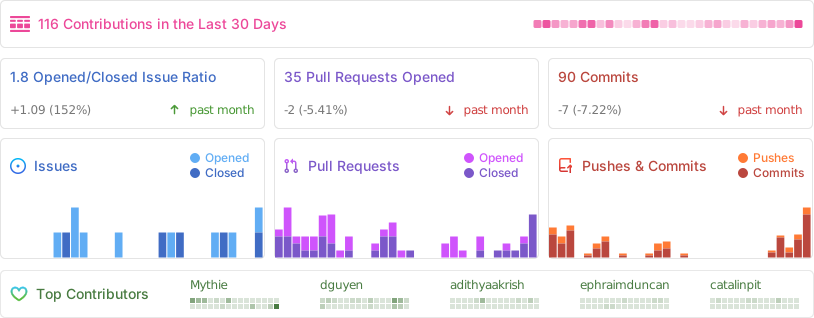
## Repo Activity
Documenso 是可自托管的电子签名解决方案,专注于将商业 SaaS 的合同签署流程带到本地环境,实现数据可控的合同创建、发送与归档。
核心功能
- 拖拽式模板:可视化定义签名、日期、文本字段,并支持多签署人顺序或并行处理。
- 签署体验:被邀请者通过浏览器完成签名、填写表单字段并查看审核日志。
- 团队协作:支持工作区、角色权限与审计记录,便于跨部门管理合同。
- Webhook 与 API:在合同状态变化时触发 Webhook,与现有 CRM、ERP 或自动化流程集成。
- 存储合规:文档与证书存放在自有存储中,满足本地化和隐私合规需求。
部署建议
- 官方 Docker Compose 使用 Next.js、Node.js 后端及 PostgreSQL,部署时需设置
NEXTAUTH_SECRET、DATABASE_URL等环境变量。 - 建议启用对象存储(S3 兼容)保存上传文件,并配置邮件服务用于发送签署邀请。
- 若要启用 OAuth 登录,可在环境变量中配置 GitHub、Google 等第三方应用凭证。
- 使用反向代理提供 HTTPS,并定期备份 PostgreSQL 数据库与文件存储以防数据丢失。