
← 返回到所有服务
GitHub 仓库信息
获取时间 · 2026年9月15日★ 773最新版本: v1.0.2最后更新: 2026年9月12日
README
# Astroluma
<p align="center">
<img src="https://getastroluma.com/img/logo.svg" alt="Astroluma" width="100" />
<br /><br />
<a href="https://github.com/Sanjeet990/Astroluma/releases">
<img src="https://img.shields.io/badge/version-1.0.1-blue?style=for-the-badge" />
</a>
<a href="https://hub.docker.com/r/sanjeet990/astroluma">
<img src="https://img.shields.io/docker/pulls/sanjeet990/astroluma?style=for-the-badge&logo=docker" />
</a>
<a href="https://github.com/Sanjeet990">
<img src="https://img.shields.io/github/stars/Sanjeet990/Astroluma?style=for-the-badge&logo=github" />
</a>
<a href="https://github.com/Sanjeet990/Astroluma/blob/main/LICENSE">
<img src="https://img.shields.io/github/license/Sanjeet990/Astroluma?style=for-the-badge" />
</a>
<br /><br />
A powerful, self-hosted home lab dashboard built with the MERN stack.
</p>
## Overview
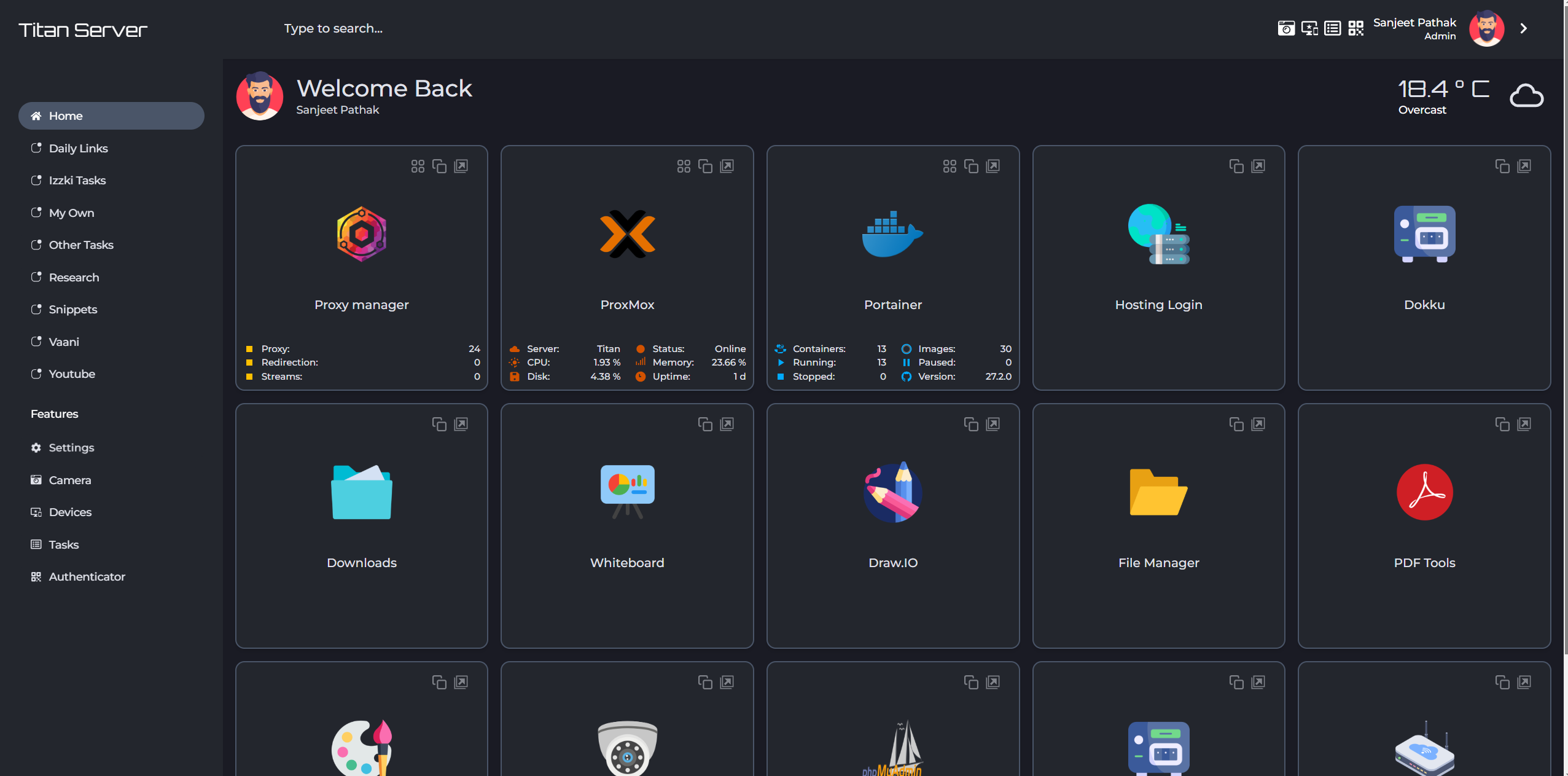
Astroluma is a feature-rich, productivity oriented, user-friendly dashboard designed to help you manage multiple aspects of your daily tasks and services. Built with flexibility in mind, it allows you to control various features like task management, device monitoring, app integration, and real-time weather updates, all from a single platform. With its responsive design and dynamic configuration options, Astroluma offers a unique blend of customization, usability, and productivity.
## Updates
**Jan 21, 2025**
- Astroluma v1.0.2 is released. Check the full changelog [here](https://github.com/Sanjeet990/Astroluma/releases)
## Features
### Core Features
- **Multi-User Support**: Individual instances for each user
- **Links Organization**: Categorize and organize links with nested categories
- **Featured Page**: Showcase important categories and links
- **Custom Domain Support**: Works simultaneously with custom domains and IPs
- **Network Device Management**:
- IPv4 network device scanning
- Wake-on-LAN support
- Device status monitoring
### Productivity Tools
- **Todo List Manager**: Create and manage multiple todo lists
- **Snippet Manager**: Store and organize code snippets
- **TOTP Generation**: Built-in Time-Based One-Time Password generation
- **Custom Page Creation**: Create and publish custom pages
### Integrations
- **Stream Hub**: Support for IP camera streams
- **Weather Integration**: Real-time weather updates
- **Third-Party Apps**:
- Bazarr
- FileBrowser
- FreshRSS
- GitHub
- HTML Code
- Heimdall
- Immich
- Linkace
- NextCloud
- Nginx Proxy Manager
- Portainer
- Proxmox
- Sonarr
- Speed Test Tracker
- TrueNAS Scale (Core untested)
- Uptime Kuma
- YouTube
- More coming soon!
- **Custom Integration Support**: Create your own app integrations
### Customization
- **Themes**: 15 built-in themes with more in development
- **Icon Pack Support**: User configurable icon pack support. Find icons [here](https://getastroluma.com/icons)
- **Flexible Layout**: Customizable sidebar and category placement
## Installation
### On Docker:
1. Create a docker-compose.yml file. Best way to do this is to use the [Astroluma Compose](https://getastroluma.com/compose)
Open Astroluma Compose and chose your preffered settings to generate your docker-compose.yml file.
Alternatively, create a docker-compose.yml similar to this:
```yml title="docker-compose.yml"
version: '3.8'
services:
app:
image: sanjeet990/astroluma:latest
container_name: astroluma
##ports:
## - "8000:8000"
environment:
PORT: 8000
NODE_ENV: production
SECRET_KEY: a2c5f9a8b2d7e1a7f2c9c8d9b5f7a3d5
MONGODB_URI: mongodb://localhost:27017/astroluma
volumes:
- uploads_data:/app/storage/uploads
- uploads_apps:/app/storage/apps
depends_on:
- mongodb
restart: always
network_mode: host
mongodb:
image: mongo:6.0
container_name: astroluma_mongodb
ports:
- "27017:27017"
volumes:
- mongo_data:/data/db
restart: always
volumes:
mongo_data:
driver: local
uploads_data:
driver: local
```
If you're still unsure about creating your own config, please contact [here](https://getastroluma.com/contact).
2. Bring up your stack by running:
```bash
docker-compose up -d
```
If using docker-compose-plugin:
```bash
docker compose up -d
```
Detailed installation doc: [Installation Guide](https://getastroluma.com/docs/getting-started/installation/)
## Demo and Resources
- **Website**: [https://getastroluma.com/](https://getastroluma.com/)
- **Live Demo**: Coming Soon!
- **Screenshots**: [https://getastroluma.com/screenshots](https://getastroluma.com/screenshots)
## FAQs
FAQ list is continuously being updated [here](https://getastroluma.com/faqs).
## Credits
A big shoutout to the people/projects who made this project possible. Check the credits [here](https://getastroluma.com/credits).
## License
This project is licensed under the GNU GENERAL PUBLIC LICENSE, Version 3, 29 June 2007.
## Contributing
Contributions are welcome! Please feel free to submit pull requests.
## Maintainer
Maintained by [@Sanjeet990](https://github.com/Sanjeet990)
## Support
[](https://www.buymeacoffee.com/sanjeet990)
Astroluma 是一个功能丰富的自托管仪表板,专为帮助您管理日常任务和服务的各个方面而设计。它提供了灵活的配置选项,让您可以从单一平台控制任务管理、设备监控、应用集成和实时天气更新等功能。
主要功能
- 多用户支持:为每个用户提供独立的实例
- 链接组织:使用嵌套类别对链接进行分类和组织
- 特色页面:展示重要类别和链接
- 自定义域名支持:同时支持自定义域名和 IP
- 网络设备管理:
- IPv4 网络设备扫描
- Wake-on-LAN 支持
- 设备状态监控
生产力工具
- 待办事项管理器:创建和管理多个待办事项列表
- 代码片段管理器:存储和组织代码片段
- TOTP 生成器:内置基于时间的一次性密码生成
- 自定义页面创建:创建和发布自定义页面
集成功能
- 流媒体中心:支持 IP 摄像头流
- 天气集成:实时天气更新
- 第三方应用集成:
- Bazarr
- FileBrowser
- FreshRSS
- GitHub
- HTML Code
- Heimdall
- Immich
- Linkace
- NextCloud
- Nginx Proxy Manager
- Portainer
- Proxmox
- Sonarr
- Speed Test Tracker
- TrueNAS Scale
- Uptime Kuma
- YouTube
自定义选项
- 主题:15 个内置主题,更多正在开发中
- 图标包支持:用户可配置的图标包支持
- 灵活布局:可自定义侧边栏和类别位置
部署要求
- Docker 环境
- MongoDB 数据库
- 现代浏览器
- 最低配置:1核 CPU,1GB 内存
- 存储空间:最小 100MB
- 网络:建议使用高速网络