
← 返回到所有服务
GitHub 仓库信息
获取时间 · 2026年9月15日★ 3,287最新版本: v0.8.0最后更新: 2026年9月13日
README
<div align="center">
<img src="./docs/images/github-cover-new.png" alt="RAG Web UI Demo">
<br />
<p>
<strong>Knowledge Base Management Based on RAG (Retrieval-Augmented Generation)</strong>
</p>
<p>
<a href="https://github.com/rag-web-ui/rag-web-ui/blob/main/LICENSE"><img src="https://img.shields.io/github/license/rag-web-ui/rag-web-ui" alt="License"></a>
<a href="#"><img src="https://img.shields.io/badge/python-3.9+-blue.svg" alt="Python"></a>
<a href="#"><img src="https://img.shields.io/badge/node-%3E%3D18-green.svg" alt="Node"></a>
<a href="#"><img src="https://img.shields.io/badge/PRs-welcome-brightgreen.svg" alt="PRs Welcome"></a>
<a href="#"><img src="https://github.com/rag-web-ui/rag-web-ui/actions/workflows/test.yml/badge.svg" alt="CI"></a>
</p>
<p>
<a href="#features">Features</a> •
<a href="#quick-start">Quick Start</a> •
<a href="#deployment-guide">Deployment</a> •
<a href="#architecture">Architecture</a> •
<a href="#development">Development</a> •
<a href="#contributing">Contributing</a> •
<a href="https://deepwiki.com/rag-web-ui/rag-web-ui" target="_blank">DeepWiki</a>
</p>
</div>
## 📖 Introduction
RAG Web UI is an intelligent dialogue system based on RAG (Retrieval-Augmented Generation) technology that helps build intelligent Q&A systems based on your own knowledge base. By combining document retrieval and large language models, it achieves accurate and reliable knowledge-based question answering services.
The system supports multiple **LLM** deployment options, including cloud services like **OpenAI**, **DeepSeek**, and **[MiniMax](https://www.minimax.io)**, as well as local model deployment through **Ollama**, meeting privacy and cost requirements in different scenarios.
It also provides OpenAPI interfaces for convenient knowledge base access via API calls.
## ✨ Features
- 📚 **Intelligent Document Management**
- Support for multiple document formats (PDF, DOCX, Markdown, Text)
- Automatic document chunking and vectorization
- Support for async document processing and incremental updates
- 🤖 **Advanced Dialogue Engine**
- Precise retrieval and generation based on RAG
- Support for multi-turn contextual dialogue
- Support for reference citations in conversations
- 🎯 **Robust Architecture**
- Frontend-backend separation design
- Distributed file storage
- High-performance vector database: Support for ChromaDB, Qdrant with easy switching through Factory pattern
## 🖼️ Screenshots
<div align="center">
<img src="./docs/images/screenshot1.png" alt="Knowledge Base Management" width="800">
<p><em>Knowledge Base Management Dashboard</em></p>
<img src="./docs/images/screenshot2.png" alt="Chat Interface" width="800">
<p><em>Document Processing Dashboard</em></p>
<img src="./docs/images/screenshot3.png" alt="Document Processing" width="800">
<p><em>Document List</em></p>
<img src="./docs/images/screenshot4.png" alt="System Settings" width="800">
<p><em>Intelligent Chat Interface with References</em></p>
<img src="./docs/images/screenshot5.png" alt="Analytics Dashboard" width="800">
<p><em>API Key Management</em></p>
<img src="./docs/images/screenshot6.png" alt="Analytics Dashboard" width="800">
<p><em>API Reference</em></p>
</div>
## Project Flowchart
```mermaid
graph TB
%% Role Definitions
client["Caller/User"]
open_api["Open API"]
subgraph import_process["Document Ingestion Process"]
direction TB
%% File Storage and Document Processing Flow
docs["Document Input<br/>(PDF/MD/TXT/DOCX)"]
job_id["Return Job ID"]
nfs["NFS"]
subgraph async_process["Asynchronous Document Processing"]
direction TB
preprocess["Document Preprocessing<br/>(Text Extraction/Cleaning)"]
split["Text Splitting<br/>(Segmentation/Overlap)"]
subgraph embedding_process["Embedding Service"]
direction LR
embedding_api["Embedding API"] --> embedding_server["Embedding Server"]
end
store[(Vector Database)]
%% Internal Flow of Asynchronous Processing
preprocess --> split
split --> embedding_api
embedding_server --> store
end
subgraph job_query["Job Status Query"]
direction TB
job_status["Job Status<br/>(Processing/Completed/Failed)"]
end
end
%% Query Service Flow
subgraph query_process["Query Service"]
direction LR
user_history["User History"] --> query["User Query<br/>(Based on User History)"]
query --> query_embed["Query Embedding"]
query_embed --> retrieve["Vector Retrieval"]
retrieve --> rerank["Re-ranking<br/>(Cross-Encoder)"]
rerank --> context["Context Assembly"]
context --> llm["LLM Generation"]
llm --> response["Final Response"]
query -.-> rerank
end
%% Main Flow Connections
client --> |"1.Upload Document"| docs
docs --> |"2.Generate"| job_id
docs --> |"3a.Trigger"| async_process
job_id --> |"3b.Return"| client
docs --> nfs
nfs --> preprocess
%% Open API Retrieval Flow
open_api --> |"Retrieve Context"| retrieval_service["Retrieval Service"]
retrieval_service --> |"Access"| store
retrieval_service --> |"Return Context"| open_api
%% Status Query Flow
client --> |"4.Poll"| job_status
job_status --> |"5.Return Progress"| client
%% Database connects to Query Service
store --> retrieve
%% Style Definitions (Adjusted to match GitHub theme colors)
classDef process fill:#d1ecf1,stroke:#0077b6,stroke-width:1px
classDef database fill:#e2eafc,stroke:#003566,stroke-width:1px
classDef input fill:#caf0f8,stroke:#0077b6,stroke-width:1px
classDef output fill:#ffc8dd,stroke:#d00000,stroke-width:1px
classDef rerank fill:#cdb4db,stroke:#5a189a,stroke-width:1px
classDef async fill:#f8edeb,stroke:#7f5539,stroke-width:1px,stroke-dasharray: 5 5
classDef actor fill:#fefae0,stroke:#606c38,stroke-width:1px
classDef jobQuery fill:#ffedd8,stroke:#ca6702,stroke-width:1px
classDef queryProcess fill:#d8f3dc,stroke:#40916c,stroke-width:1px
classDef embeddingService fill:#ffe5d9,stroke:#9d0208,stroke-width:1px
classDef importProcess fill:#e5e5e5,stroke:#495057,stroke-width:1px
%% Applying classes to nodes
class docs,query,retrieval_service input
class preprocess,split,query_embed,retrieve,context,llm process
class store,nfs database
class response,job_id,job_status output
class rerank rerank
class async_process async
class client,open_api actor
class job_query jobQuery
style query_process fill:#d8f3dc,stroke:#40916c,stroke-width:1px
style embedding_process fill:#ffe5d9,stroke:#9d0208,stroke-width:1px
style import_process fill:#e5e5e5,stroke:#495057,stroke-width:1px
style job_query fill:#ffedd8,stroke:#ca6702,stroke-width:1px
```
## 🚀 Quick Start
### Prerequisites
- Docker & Docker Compose v2.0+
- Node.js 18+
- Python 3.9+
- 8GB+ RAM
### Installation
1. Clone the repository
```bash
git clone https://github.com/rag-web-ui/rag-web-ui.git
cd rag-web-ui
```
2. Configure environment variables
You can check the details in the configuration table below.
```bash
cp .env.example .env
```
3. Start services(development server)
```bash
docker compose up -d --build
```
### Verification
Access the following URLs after service startup:
- 🌐 Frontend UI: http://127.0.0.1.nip.io
- 📚 API Documentation: http://127.0.0.1.nip.io/redoc
- 💾 MinIO Console: http://127.0.0.1.nip.io:9001
## 🏗️ Architecture
### Backend Stack
- 🐍 **Python FastAPI**: High-performance async web framework
- 🗄️ **MySQL + ChromaDB**: Relational + Vector databases
- 📦 **MinIO**: Distributed object storage
- 🔗 **Langchain**: LLM application framework
- 🔒 **JWT + OAuth2**: Authentication
### Frontend Stack
- ⚛️ **Next.js 14**: React framework
- 📘 **TypeScript**: Type safety
- 🎨 **Tailwind CSS**: Utility-first CSS
- 🎯 **Shadcn/UI**: High-quality components
- 🤖 **Vercel AI SDK**: AI integration
## 📈 Performance Optimization
The system is optimized in the following aspects:
- ⚡️ Incremental document processing and async chunking
- 🔄 Streaming responses and real-time feedback
- 📑 Vector database performance tuning
- 🎯 Distributed task processing
## 📖 Development Guide
```bash
docker compose -f docker-compose.dev.yml up -d --build
```
## 🔧 Configuration
### Core Configuration
| Parameter | Description | Default | Required |
| --------------------------- | -------------------------- | --------- | -------- |
| MYSQL_SERVER | MySQL Server Address | localhost | ✅ |
| MYSQL_USER | MySQL Username | postgres | ✅ |
| MYSQL_PASSWORD | MySQL Password | postgres | ✅ |
| MYSQL_DATABASE | MySQL Database Name | ragwebui | ✅ |
| SECRET_KEY | JWT Secret Key | - | ✅ |
| ACCESS_TOKEN_EXPIRE_MINUTES | JWT Token Expiry (minutes) | 30 | ✅ |
### LLM Configuration
| Parameter | Description | Default | Applicable |
| ----------------- | --------------------- | ------------------------- | --------------------- |
| CHAT_PROVIDER | LLM Service Provider | openai | ✅ |
| OPENAI_API_KEY | OpenAI API Key | - | Required for OpenAI |
| OPENAI_API_BASE | OpenAI API Base URL | https://api.openai.com/v1 | Optional for OpenAI |
| OPENAI_MODEL | OpenAI Model Name | gpt-4 | Required for OpenAI |
| DEEPSEEK_API_KEY | DeepSeek API Key | - | Required for DeepSeek |
| DEEPSEEK_API_BASE | DeepSeek API Base URL | - | Required for DeepSeek |
| DEEPSEEK_MODEL | DeepSeek Model Name | - | Required for DeepSeek |
| OLLAMA_API_BASE | Ollama API Base URL | http://localhost:11434 | Required for Ollama |
| OLLAMA_MODEL | Ollama Model Name | llama2 | Required for Ollama |
| MINIMAX_API_KEY | MiniMax API Key | - | Required for MiniMax |
| MINIMAX_API_BASE | MiniMax API Base URL | https://api.minimax.io/v1 | Optional for MiniMax |
| MINIMAX_MODEL | MiniMax Model Name | MiniMax-M2.7 | Required for MiniMax |
### Embedding Configuration
| Parameter | Description | Default | Applicable |
| --------------------------- | -------------------------- | ---------------------- | ----------------------------- |
| EMBEDDINGS_PROVIDER | Embedding Service Provider | openai | ✅ |
| OPENAI_API_KEY | OpenAI API Key | - | Required for OpenAI Embedding |
| OPENAI_EMBEDDINGS_MODEL | OpenAI Embedding Model | text-embedding-ada-002 | Required for OpenAI Embedding |
| DASH_SCOPE_API_KEY | DashScope API Key | - | Required for DashScope |
| DASH_SCOPE_EMBEDDINGS_MODEL | DashScope Embedding Model | - | Required for DashScope |
| OLLAMA_EMBEDDINGS_MODEL | Ollama Embedding Model | deepseek-r1:7b | Required for Ollama Embedding |
### Vector Database Configuration
| Parameter | Description | Default | Applicable |
| ------------------ | --------------------------------- | --------------------- | --------------------- |
| VECTOR_STORE_TYPE | Vector Store Type | chroma | ✅ |
| CHROMA_DB_HOST | ChromaDB Server Address | localhost | Required for ChromaDB |
| CHROMA_DB_PORT | ChromaDB Port | 8000 | Required for ChromaDB |
| QDRANT_URL | Qdrant Vector Store URL | http://localhost:6333 | Required for Qdrant |
| QDRANT_PREFER_GRPC | Prefer gRPC Connection for Qdrant | true | Optional for Qdrant |
### Object Storage Configuration
| Parameter | Description | Default | Required |
| ----------------- | -------------------- | -------------- | -------- |
| MINIO_ENDPOINT | MinIO Server Address | localhost:9000 | ✅ |
| MINIO_ACCESS_KEY | MinIO Access Key | minioadmin | ✅ |
| MINIO_SECRET_KEY | MinIO Secret Key | minioadmin | ✅ |
| MINIO_BUCKET_NAME | MinIO Bucket Name | documents | ✅ |
### Other Configuration
| Parameter | Description | Default | Required |
| --------- | ---------------- | ------------- | -------- |
| TZ | Timezone Setting | Asia/Shanghai | ❌ |
## 🤝 Contributing
We welcome community contributions!
### Contribution Process
1. Fork the repository
2. Create a feature branch (`git checkout -b feature/AmazingFeature`)
3. Commit changes (`git commit -m 'Add some AmazingFeature'`)
4. Push to branch (`git push origin feature/AmazingFeature`)
5. Create a Pull Request
### Development Guidelines
- Follow [Python PEP 8](https://pep8.org/) coding standards
- Follow [Conventional Commits](https://www.conventionalcommits.org/)
### 🚧 Roadmap
- [x] Knowledge Base API Integration
- [ ] Workflow By Natural Language
- [ ] Multi-path Retrieval
- [x] Support Multiple Models
- [x] Support Multiple Vector Databases
## 🔧 Troubleshooting
For common issues and solutions, please refer to our [Troubleshooting Guide](docs/troubleshooting.md).
## 📄 License
This project is licensed under the [Apache-2.0 License](LICENSE)
## Note
This project is for learning and sharing RAG knowledge only. Please do not use it for commercial purposes. It is not ready for production use and is still under active development.
## 🙏 Acknowledgments
Thanks to these open source projects:
- [FastAPI](https://fastapi.tiangolo.com/)
- [Langchain](https://python.langchain.com/)
- [Next.js](https://nextjs.org/)
- [ChromaDB](https://www.trychroma.com/)
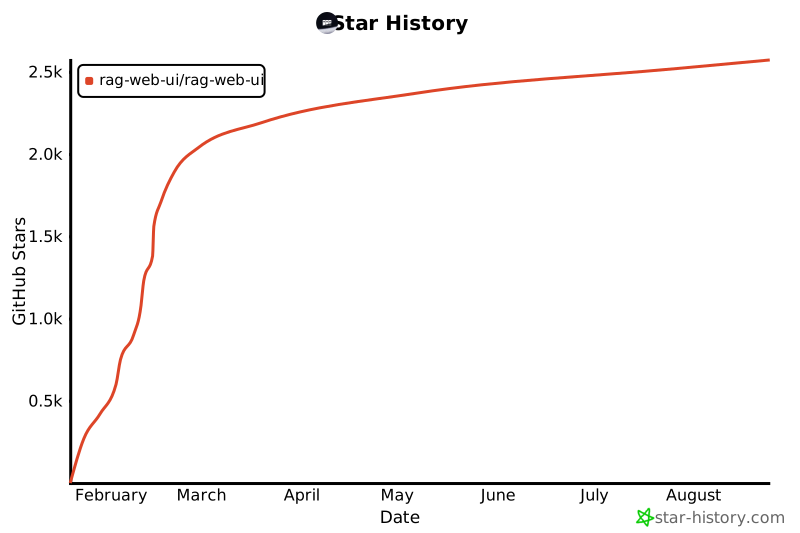
---
<div align="center">
If this project helps you, please consider giving it a ⭐️
</div>
RAG Web UI 是一个基于 RAG (Retrieval-Augmented Generation) 技术的智能对话系统,它能够帮助用户构建基于自有知识库的智能问答系统。通过结合文档检索和大语言模型,实现准确可靠的知识库问答服务。
主要功能
- 多模型支持:支持多种 LLM 部署选项,包括 OpenAI、DeepSeek 等云服务,以及通过 Ollama 进行本地模型部署
- 知识库管理:支持文档导入、处理和向量化存储
- 智能问答:基于知识库的智能问答服务
- API 接口:提供 OpenAPI 接口,方便通过 API 调用访问知识库
- 隐私保护:支持本地部署,保护数据隐私
- Docker 支持:提供 Docker 镜像,一键部署
技术栈
- 后端:
- Python FastAPI
- MySQL + ChromaDB
- MinIO 对象存储
- Langchain
- JWT + OAuth2 认证
- 前端:
- Next.js 14
- TypeScript
- Tailwind CSS
- Shadcn/UI
- Vercel AI SDK
部署要求
- 系统要求:
- Docker & Docker Compose v2.0+
- Node.js 18+
- Python 3.9+
- 8GB+ RAM
- 依赖服务:
- MySQL 数据库
- ChromaDB 向量数据库
- MinIO 对象存储
- 网络要求:
- 可访问 LLM API(如使用云服务)
- 或本地部署 LLM 模型