
← 返回到所有服务
GitHub 仓库信息
获取时间 · 2026年9月15日★ 3,193最新版本: v2.12.0最后更新: 2026年9月14日
README
<div align="center">
[](https://pwpush.com/)
**Share passwords, text, files & URLs securely with self-deleting links and full audit logs.**
[](https://pwpush.com)
[](https://docs.pwpush.com)
[](https://hub.docker.com/r/pglombardo/pwpush)
[](https://hub.docker.com/r/pglombardo/pwpush-ephemeral)
[](https://github.com/pglombardo/PasswordPusher/blob/master/LICENSE)
[](https://github.com/pglombardo/PasswordPusher)
</div>
---
**v2.0 is released.** If you already self-host, see the **[upgrade guide](UPGRADE-2.0.md)** for migration notes and configuration changes.
---
## What is Password Pusher?
**Password Pusher** is an open source web app for sharing sensitive information safely. You push a password, note, file, or URL; the recipient gets a one-time link that expires after a set number of views and/or time. No more sending secrets over chat or email—encrypted, auditable, and auto-self-destruct.
Use the [hosted service](https://pwpush.com) or run your own instance with Docker in minutes.
---
## Why Password Pusher?
| | |
|---|---|
| **🔒 Secure by default** | Encrypted storage, optional passphrase, expiry by views and/or time. Sensitive data is removed entirely once expired. |
| **📋 Full audit trail** | See when links were created, viewed, and by whom (with logins). |
| **🏠 Self-host or use hosted** | Use [pwpush.com](https://pwpush.com) or deploy your own—Docker, Kubernetes, Helm, or cloud. |
| **🌐 Ready for teams** | 31 languages, light/dark theme, JSON API, [official CLI & Chrome Extension](#tools--extensions), and [many integrations](https://docs.pwpush.com/docs/3rd-party-tools/). |
---
## Financial Supporters
A heartfelt thank you to the companies and individuals who help keep Password Pusher running. Their support goes toward hosting, maintenance, support and continued development.
| Supporter | |
|---|---|
| [<img width="392" height="134" alt="SerpApi" src="https://github.com/user-attachments/assets/f4c7369f-d56c-437f-8cb6-dd08c2129ed8" />](https://serpapi.com/?utm_source=pwpush) | SerpApi is the world’s leading provider of search data, pioneering APIs that turn search engine results into structured, developer-ready information. |
| [WMACCESS](https://www.wmaccess.com/) | Provides securities information and tax-relevant financial data, including securities master data and income data for comprehensive tax reporting. |
A special thank you as well to every customer who [subscribed to a plan on pwpush.com](https://eu.pwpush.com/pricing) or purchased [Self-Hosted Pro](https://eu.pwpush.com/self-hosted-pricing) — your support directly funds the ongoing development of Password Pusher.
Interested in supporting Password Pusher? Reach out at [support@pwpush.com](mailto:support@pwpush.com).
---
## Features
### Security & privacy
- **Encrypted at rest** — Sensitive data is stored encrypted and deleted when expired.
- **Expiry controls** — Limit by number of views and/or time; links can require a passphrase.
- **Two-factor authentication (MFA)** — TOTP (authenticator apps) with backup codes; admins can require MFA instance-wide with `PWP__REQUIRE_MFA=true`.
- **Audit logging** — Track what was shared and who viewed it (with optional logins).
- **Unbranded delivery page** — No logos, superfluous text or unrelated links to confuse push recipients.
### Self-host & customize
- **One-command deploy** — Docker Compose with automatic SSL/TLS
- **Database or ephemeral** — Use a database for persistence or run stateless.
- **Admin dashboard** — Manage your instance from a built-in admin UI.
- **White-label** — Custom theme, logo, site name, and [26 Bootswatch themes](https://docs.pwpush.com/docs/themes/) via env vars.
- **Custom CSS** — Add your own styles; light/dark follows system preference.
### Integrations & API
- **JSON API v2** — Modern `/api/v2` endpoints for create/retrieve/audit/active/expired workflows.
- **Legacy API compatibility** — Existing `/p`, `/f`, `/r` API routes (v1 style) remain available for backwards compatibility.
- **CLI** — Official [pwpush CLI](https://github.com/pglombardo/pwpush-cli) plus [3rd-party tools](https://docs.pwpush.com/docs/3rd-party-tools/) and scripts.
- **31 languages** — UI and secret-URL pages in 31 languages (courtesy of [Translation.io](https://translation.io/?utm_source=pwpush)).
### Trust & community
- **Open source** — Apache 2.0; no black box. Written and maintained by [myself](https://github.com/pglombardo) and the team at [Apnotic](https://apnotic.com) with the help of contributors.
- **15+ years in production** — Used to deliver millions of secrets; [actively maintained](https://github.com/pglombardo/PasswordPusher/graphs/contributors).
- **Trusted worldwide** — Used by thousands of companies around the globe.
---
## Screenshots
| [](app/assets/images/features/front-page-large.png) | [](app/assets/images/features/audit-log-large.png) | [](app/assets/images/features/secret-url-languages-large.png) |
|:---:|:---:|:---:|
| **Create a push** | **Audit log** | **Multi-language URLs** |
| [](app/assets/images/features/password-generator-large.png) | [](app/assets/images/features/dark-theme.gif) | [](app/assets/images/features/preliminary-step.gif) |
|:---:|:---:|:---:|
| **Password generator** | **Dark theme** | **Optional preview step** |
---
## Editions
| | **Open source (this repo)** | **Pro (pwpush.com)** |
|---|---|---|
| **Try it** | [oss.pwpush.com](https://oss.pwpush.com) | [pwpush.com](https://pwpush.com) |
| **Use case** | Self-host or use OSS demo | Hosted Pro with extra features |
| **Details** | Full source here; you deploy or use the OSS demo. | Pro features are [periodically migrated](https://docs.pwpush.com/docs/editions/) to OSS. |
**Feature comparison:** [pwpush.com/features#matrix](https://pwpush.com/features#matrix)
### Self-Hosted Password Pusher Pro
Self-hosted **Pro** (with licensing) is now available. Pro features not yet in OSS will be available for self-hosted deployments.
---
## Quick Start
### Use the hosted service
No setup: **[pwpush.com](https://pwpush.com)** — create a push and share the link.
### Run your own instance with Docker Compose
1. Point a DNS record to your server (e.g. `pwpush.example.com`).
2. Clone this repo or download [docker-compose.yml](https://raw.githubusercontent.com/pglombardo/PasswordPusher/refs/heads/master/docker-compose.yml).
3. In `docker-compose.yml`, uncomment and set:
- `TLS_DOMAIN: 'pwpush.example.com'` (for automatic Let’s Encrypt TLS).
- Optionally set `PWPUSH_MASTER_KEY` (see comments in the file; generate at [us.pwpush.com/generate_key](https://us.pwpush.com/generate_key)).
4. Run:
```bash
docker compose up -d
```
Open `https://pwpush.example.com`. The Compose file includes persistent storage, health checks, and is suitable for production.
_Note: If you didn't set `TLS_DOMAIN`, uncomment port 5100 and visit the application on http://your-ip:5100_
### Cloud deploy & contributor setup
The repo includes ready-to-adapt configs for common platforms and local dev:
| File / path | Use |
|-------------|-----|
| [app.json](app.json) | Heroku-style deploy (env vars, `postdeploy` / `db:prepare`, process types). |
| [.do/deploy.template.yaml](.do/deploy.template.yaml) | [DigitalOcean App Platform](https://docs.digitalocean.com/products/app-platform/) spec (web + job, secrets placeholders). |
| [render.yaml](render.yaml) | [Render](https://render.com/) Blueprint (web + Postgres, health `/up`; optional worker commented). |
| [fly.toml](fly.toml) | [Fly.io](https://fly.io/) (`fly launch` — set `app` name; Dockerfile `containers/docker/Dockerfile`). |
| [railway.toml](railway.toml) | [Railway](https://railway.com/) config-as-code (Dockerfile path; set secrets in dashboard). |
| [.devcontainer/](.devcontainer/) | VS Code / GitHub Codespaces: Ruby + Postgres, repo mounted at `/workspace`, `bin/setup`. |
Production image build: [containers/docker/Dockerfile](containers/docker/Dockerfile). Root [docker-compose.yml](docker-compose.yml) uses the published image; [.devcontainer/docker-compose.yml](.devcontainer/docker-compose.yml) is for development with a mounted working tree.
### Use the API, CLI, or integrations
For API usage, CLI tools, and integrations:
- **pwpush CLI**: [github.com/pglombardo/pwpush-cli](https://github.com/pglombardo/pwpush-cli) — Official command-line tool for pushing secrets from the terminal
- API v2 docs: [docs.pwpush.com/docs/api-v2](https://docs.pwpush.com/docs/api-v2/)
- OSS API endpoint reference in-app: `/api/v2/version` and `/api/v2/pushes`
- 3rd-party tools: [docs.pwpush.com/docs/3rd-party-tools](https://docs.pwpush.com/docs/3rd-party-tools/)
Quick API v2 smoke test:
```bash
curl -s https://YOUR_HOST/api/v2/version
```
---
## Tools & Extensions
Enhance Password Pusher with these official companion tools:
| CLI | Chrome Extension |
|:---:|:---:|
| [](https://github.com/pglombardo/pwpush-cli) | [](https://chromewebstore.google.com/detail/djdnbhbnimfpfmnocchfhjahinieaacg) |
| Command-line tool for pushing secrets from the terminal | Create pushes directly from your browser with self-hosted & APIv2 support |
---
## Documentation
Full docs: **[docs.pwpush.com](https://docs.pwpush.com)** — installation, configuration, API, themes, and more.
---
## Language translations
**[Translation.io](https://translation.io/?utm_source=pwpush)** has provided free translation tooling for the OSS version of Password Pusher. The app ships with **31 UI languages**.
[](https://translation.io/?utm_source=pwpush)
Consider [Translation.io](https://translation.io/?utm_source=pwpush) for your company or project’s translation needs.
---
## Credits
### Security researchers
- **Kullai Metikala** — [GitHub](https://github.com/kullaisec) \| [LinkedIn](https://www.linkedin.com/in/kullai-metikala-8378b122a/)
- [Positive Technologies](https://global.ptsecurity.com)
- **Igniter** — [GitHub](https://github.com/igniter07)
### Translators
| Name | Language |
|------|----------|
| [Oyale](https://github.com/oyale) | [Catalan](https://pwpush.com/ca), [Spanish](https://pwpush.com/es) |
| Finn Skaaning | [Danish](https://pwpush.com/da/p/ny) |
| [Mihail Tchetchelnitski](https://github.com/mtchetch) | [Finnish](https://pwpush.com/fi/p/uusi) |
| [Thibaut](https://github.com/tibo59) | [French](https://pwpush.com/fr/p/Nouveau) |
| Thomas Wölk | [German](https://pwpush.com/de/p/neu) — [GitHub](https://github.com/confluencepoint), [Twitter](https://twitter.com/confluencepoint) |
| Martin Otto | [German](https://pwpush.com/de/p/neu) |
| Robin Jørgensen | [Norwegian](https://pwpush.com/no/p/ny) |
| [Łukasz](https://github.com/drpt) | [Polish](https://pwpush.com/pl/p/nowy) |
| [Jair Henrique](https://github.com/jairhenrique/), [Fabrício Rodrigues](https://www.linkedin.com/in/ifabriciorodrigues/), [Ivan Freitas](https://github.com/IvanMFreitas), Sara Faria | [Portuguese (BR)](https://pwpush.com/pt-br/p/novo) |
| Pedro Marques | [European Portuguese](https://pwpush.com/pt-pt/p/novo) |
| johan323, Fredrik Arvas | [Swedish](https://pwpush.com/sv/p/ny) |
Thanks also to [Translation.io](https://translation.io) for managing translations (free for open source).
### Containers & infrastructure
- [@fiskhest](https://github.com/fiskhest) — [Kubernetes manifests](https://github.com/pglombardo/PasswordPusher/tree/master/containers/kubernetes)
- [@sfarosu](https://github.com/sfarosu) — [Docker, Kubernetes & OpenShift support](https://github.com/pglombardo/PasswordPusher/pull/82)
- [sirux88](https://github.com/sirux88) — Docker cleanup and multistage builds
### Other
- [@iandunn](https://github.com/iandunn) — Password form security
- [Kasper Grubbe](https://github.com/kaspergrubbe) — [JSON POST fix](https://github.com/pglombardo/PasswordPusher/pull/3)
- [JarvisAndPi](http://www.reddit.com/user/JarvisAndPi) — Favicon design
More: [Contributors](https://github.com/pglombardo/PasswordPusher/graphs/contributors)
---
## Stay updated
- **Newsletter** — [Sign up](https://buttondown.email/pwpush?tag=github) for release notes, security updates, and tips.
- **Social** — [X](https://x.com/pwpush), [Reddit](https://www.reddit.com/r/pwpush), [Facebook](https://www.facebook.com/pwpush)
---
## Donations
🛑 **Because of some abuse, the donation link is temporarily disabled. Contact support@pwpush.com if you'd like to donate**
--> _To those testing various cards and failing, do what you do but please not here. We can't risk getting the account flagged in Stripe - we're not big enough to deal with that type of damage. I hope you can understand our position._
Donations are **optional**. Password Pusher is and will remain open source and free to use.
If it’s useful to you and you’d like to support development, donations are greatly appreciated and go toward hosting, maintenance, testing, and new features.
| [](https://buy.stripe.com/7sI4gCgTT1tr6WY3cd) | [**Donate via Stripe**](https://buy.stripe.com/7sI4gCgTT1tr6WY3cd) |
|---|---|
You can also support the project with a [paid plan on pwpush.com](https://pwpush.com/pricing).
**Note:** Password Pusher is operated by Apnotic, LLC. Donations support the project but are not tax-deductible charitable contributions. See [FAQ](https://docs.pwpush.com/docs/faq/) for more on [Apnotic](https://docs.pwpush.com/docs/faq/#what-is-apnotic) and [trust & security](https://docs.pwpush.com/docs/faq/#trust-is-a-concern--why-should-i-trust-and-use-password-pusher).
---
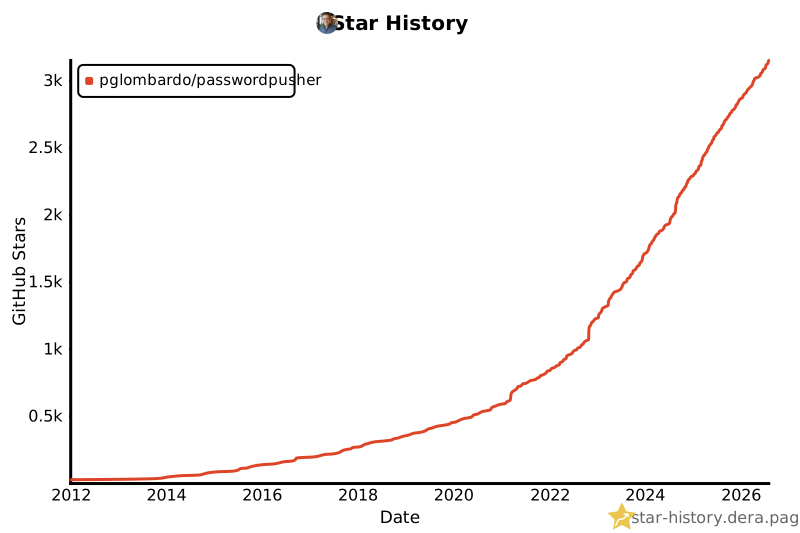
## Star history
[](https://star-history.dera.page/#pglombardo/PasswordPusher&type=date&legend=top-left)
---
## License
This project is licensed under the **Apache License 2.0**. See [LICENSE](https://github.com/pglombardo/PasswordPusher/blob/master/LICENSE) for details.
---
## Citation
```bibtex
@misc{PasswordPusher,
author = {Peter Giacomo Lombardo},
title = {Password Pusher: Securely share sensitive information with automatic expiration and deletion. Track who, what and when with full audit logs.},
year = {2026},
publisher = {GitHub},
howpublished = {\url{https://github.com/pglombardo/PasswordPusher}}
}
```
PasswordPusher 是一个用于安全分享敏感信息的自托管工具。它允许用户分享密码、密钥等敏感信息,并支持在指定次数查看后或指定时间后自动过期和删除。所有操作都有完整的审计日志记录。
主要功能
- 自动过期:支持按查看次数或时间自动过期
- 安全加密:所有内容都经过加密存储
- 审计日志:记录所有访问和操作
- 一次性查看:支持阅后即焚功能
- 密码保护:可为分享内容设置额外密码
- 多种格式:支持文本、密码、文件等多种格式
- API 支持:提供完整的 API 接口
- Docker 支持:支持容器化部署
- 多语言支持:支持多种语言界面
- 自定义主题:支持自定义界面主题
部署要求
- Ruby 环境
- PostgreSQL 数据库
- Redis(可选,用于缓存)
- 最低配置:1核 CPU,512MB 内存
- 推荐配置:2核 CPU,1GB 内存
- 存储空间:基础安装约 200MB,实际需求取决于数据量