
← 返回到所有服务
GitHub 仓库信息
获取时间 · 2026年11月27日★ 4,760最新版本: v5.5.0最后更新: 2026年11月25日
README
# MTranServer
[中文](README.md) | [English](docs/README_en.md) | [日本語](docs/README_ja.md) | [Français](docs/README_fr.md) | [Deutsch](docs/README_de.md)
在自己电脑上运行的免费离线翻译服务,速度超快⚡,不需要显卡(但也支持显卡加速)。支持多种语言,可搭配浏览器和编辑器插件使用。速度和内存占用取决于电脑配置、语言和文本长度。
适合日常阅读和理解大意。翻译结果可能有误,重要内容请核对原文。推荐搭配具有双语翻译对照功能的软件使用。
> 从 v4 或更早版本升级后,首次使用某个翻译方向时可能需要重新准备翻译文件。
<img src="./images/preview.png" width="auto" height="460">
## 在线试用
> 可能不是最新版的模型
| 网站 | TOKEN | 其他接口 | 提供者 |
| --- | --- | --- | --- |
| [ipacel.cc](https://MTranServer.ipacel.cc/ui/?token=__IpacEL_MT_API_TOKEN__) | `__IpacEL_MT_API_TOKEN__` | 沉浸式翻译: `https://MTranServer.ipacel.cc/imme?token=__IpacEL_MT_API_TOKEN__` | [@ApliNi](https://github.com/ApliNi) |
感谢社区贡献者为用户提供试用服务!
## 使用
日常使用建议装桌面端。服务器用 Docker 或命令行。v5 不提供服务端单文件可执行程序。
### 桌面端
从 [Releases](https://github.com/xxnuo/MTranServer/releases) 下载对应平台的安装包,安装后启动。托盘菜单可以管理服务,程序自带简单界面和接口文档。


### 命令行
```bash
npx mtranserver@latest
```
`npx` 可换成 `bunx`、`pnpx` 等。需要常驻时:
```bash
npm i -g mtranserver@latest
mtranserver
```
`npm` 可换成 `bun`、`pnpm` 等。首次翻译某个语言方向时会联网下载并准备文件,之后会复用。建议先翻译一小段确认可用。
### Docker
默认镜像只使用 CPU。在空目录写入 `compose.yml`:
```yml
services:
mtranserver:
image: xxnuo/mtranserver:latest
container_name: mtranserver
restart: unless-stopped
ports:
- "8989:8989"
environment:
- MT_HOST=0.0.0.0
- MT_PORT=8989
- MT_MODEL_DIR=/app/models
- MT_CONFIG_DIR=/root/.config/mtran/server
- MT_OFFLINE=false
- MT_CPU_ONLY=true
# - MT_API_TOKEN=your_secret_token_here
volumes:
- ./models:/app/models
- ./config:/root/.config/mtran
```
```bash
docker pull xxnuo/mtranserver:latest
docker compose up -d
```
需要 GPU 时,在本仓库目录使用对应配置。它们依赖宿主驱动,以 WebGPU/Vulkan 推理,不含 CUDA/TensorRT:
```bash
docker compose -f compose.intel.yml up -d # Intel,映射 /dev/dri
docker compose -f compose.amd.yml up -d # AMD,映射 /dev/dri
docker compose -f compose.nvidia.yml up -d # NVIDIA Container Toolkit
```
GPU 配置会按实测选择后端,并保留 CPU 回退。
### 升级与离线
1. 升级前保留原来的配置目录和模型目录。
2. 升级后保持联网,把要用的每个翻译方向试译一次,等文件准备完成。
3. 准备好后可在设置中开启离线模式,或加上 `--offline` / `MT_OFFLINE=true`。离线时只能用已经准备好的方向。
4. 换机器或迁移 Docker 时,配置和模型两个目录都要带走。
上面的 Docker 示例把它们放在当前目录的 `config` 和 `models`。离线部署前先联网准备,再把 `MT_OFFLINE` 改为 `true` 后重启。
## 接入
### 浏览器插件
把下表地址填进插件。超时或机器吃力时,再降低并发和单次长度。
| 接口 | 方法 | 插件 | 地址 |
| --- | --- | --- | --- |
| `/imme` | POST | [沉浸式翻译](https://immersivetranslate.com/) | `http://localhost:8989/imme` |
| `/kiss` | POST | [简约翻译](https://github.com/fishjar/kiss-translator) | `http://localhost:8989/kiss` |
| `/deepl` | POST | 支持 DeepL API v2 的客户端 | `http://localhost:8989/deepl` |
| `/deeplx` | POST | 支持 DeepLX 的客户端 | `http://localhost:8989/deeplx` |
| `/hcfy` | POST | [划词翻译](https://github.com/Selection-Translator/crx-selection-translate) | `http://localhost:8989/hcfy` |
| `/google/language/translate/v2` | POST | 支持 Google Translate API v2 的客户端 | `http://localhost:8989/google/language/translate/v2` |
| `/google/translate_a/single` | GET | 支持 Google 网页翻译的客户端 | `http://localhost:8989/google/translate_a/single` |
设置了 `MT_API_TOKEN` 时:
| 插件 | 填法 |
| --- | --- |
| 沉浸式翻译 | URL 改为 `http://localhost:8989/imme?token=你的令牌` |
| 简约翻译 | URL 仍是 `/kiss`,`KEY` 填令牌 |
| DeepL | `DeepL-Auth-Key` 或 `Bearer` |
| DeepLX、划词翻译 | URL 的 `token` 参数,或 `Bearer` |
| Google Translate API | `key` 参数,或 `Bearer` |
### 其他项目
- [MTranCode](https://github.com/xxnuo/MTranCode):VS Code、Cursor 等的注释翻译插件,商店搜索 `MTranCode`。默认请求 `http://localhost:8989`。基于 [vscode-comment-translate](https://github.com/intellism/vscode-comment-translate)。
- [MTranBrowser](https://github.com/xxnuo/MTranBrowser):开发中。
- npm 包 `mtranserver` 也可作为库调用,类型见发布包里的声明文件。
有衍生项目欢迎提 PR,补到这里。
### 常用参数
```bash
mtranserver --help
mtranserver --host 127.0.0.1 --port 8080
mtranserver --download en_zh zh_en
mtranserver --languages
mtranserver --offline
```
| 参数 | 说明 |
| --- | --- |
| `--host` / `--port` | 监听地址和端口,默认 `0.0.0.0:8989` |
| `--ui` / `--no-ui` | 开关网页界面,默认开 |
| `--offline` | 只用已经准备好的翻译文件 |
| `--download <方向...>` | 下载并准备,例如 `en_zh zh_en` |
| `--languages [过滤]` | 列出可下载的方向 |
| `--worker-idle-timeout <秒>` | 空闲后释放引擎,默认 60 |
| `--cache-size <条数>` | 缓存最近译文,默认 1000,`0` 为关闭 |
| `--fast` / `--no-fast` | 启用快速模式,默认关闭;可能增加误译 |
| `--api-token <令牌>` | API 访问令牌 |
环境变量和其余参数见 [API.md](API.md),或运行 `mtranserver --help`。
## 性能
AMD Ryzen 9 9950X(4 CPU 配额、3 GiB 内存、纯 CPU、关闭缓存),HTTP 三轮轮换中位数,详见[CPU 对比测试](docs/benchmarks/cpu-comparison-2026-11-23.md)与[双模式优化报告](docs/benchmarks/performance-optimization-2026-11-23.md)。毫秒越低越好,次/秒越高越好。
| 方向 | 输入 | 并发 | 默认 | Fast |
| --- | --- | --- | --- | --- |
| 英 → 中 | 短句 | 1 | 1.6 ms | **1.4 ms** |
| 英 → 中 | 段落 | 1 | 4.5 ms | **3.8 ms** |
| 中 → 英 | 短句 | 1 | 1.9 ms | **1.4 ms** |
| 中 → 英 | 段落 | 1 | 5.4 ms | **4.2 ms** |
| 英 → 中 | 长文(32 句) | 1 | 30.6 ms | **23.5 ms** |
| 中 → 英 | 长文(32 句) | 1 | 50.8 ms | **30.8 ms** |
| 英 → 中 | 短句 | 8 | 1212 次/秒 | **1974 次/秒** |
| 中 → 英 | 短句 | 8 | 1125 次/秒 | **2134 次/秒** |
同时加载英中、中英模型后,热态内存约为:普通 442 MiB(热启动就绪 0.98 s)、Fast 506 MiB(就绪 0.78 s)。
长文支持句子并发与连续批调度;详见[2026-11-23 对比测试](docs/benchmarks/cpu-comparison-2026-11-23.md)与[性能优化报告](docs/benchmarks/performance-optimization-2026-11-23.md)。`--fast` 开启 Fast,默认关闭;可能增加误译。[译文对比](tests/fixtures/translation-quality-regressions.json)。
- 桌面场景:推荐普通模式,优先保证翻译准确性;支持 GPU 加速,独显在适合的负载下可能比 CPU 快数倍。
- 服务器场景:推荐 Fast 模式,侧重稳定吞吐与速度,可利用多种 CPU 指令集加速。
## 同类项目
| 项目 | 内存 | 速度 | 说明 |
| --- | --- | --- | --- |
| [NLLB](https://github.com/facebookresearch/fairseq/tree/nllb) | 很高 | 慢 | Android 移植见 [RTranslator](https://github.com/niedev/RTranslator),仍然占内存 |
| [LibreTranslate](https://github.com/LibreTranslate/LibreTranslate) | 很高 | 中等 | [社区数据](https://community.libretranslate.com/t/performance-benchmark-data/486):中端 CPU 约 3 句/秒,高端约 15–20 句/秒 |
| [OPUS-MT](https://github.com/Helsinki-NLP/Opus-MT) | 高 | 快 | [CTranslate2 基准](https://github.com/OpenNMT/CTranslate2#benchmarks) |
| 其他大模型 | 超高 | 很慢 | 效果好,硬件要求高;高并发常用 vLLM |
| [LinguaSpark](https://github.com/LinguaSpark/server) | 较低 | 快 | [CPU 对比测试](docs/benchmarks/cpu-comparison-2026-11-23.md) |
| 本项目 | 随模型和并发变化 | 超快 | CPU 翻译,无缓存状态 |
## 更多
高级配置见 [API.md](API.md) 和启动后的接口文档。
[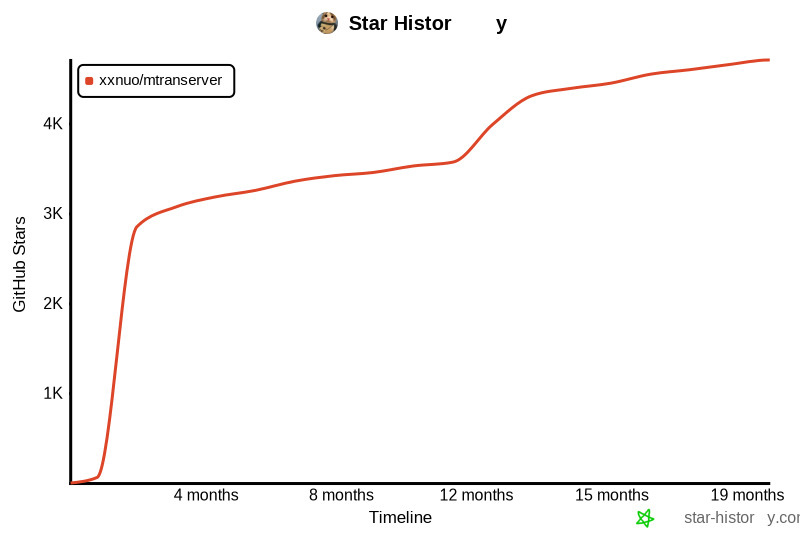](https://www.star-history.com/#xxnuo/MTranServer&Timeline)
## Thanks
[Bergamot Project](https://browser.mt/) for the inspiration for local translation.
[ONNX Runtime](https://github.com/microsoft/onnxruntime) for the translation runtime.
[Mozilla](https://github.com/mozilla) for the [models](https://github.com/mozilla/firefox-translations-models).
MTranServer 是一个轻量级的翻译服务器,支持多种翻译引擎和API,可以方便地集成到各种应用中。
主要功能
- 多引擎支持:支持多种翻译引擎,包括Google、百度、有道等
- API接口:提供RESTful API接口,方便集成
- 批量翻译:支持批量文本翻译
- 语言检测:自动检测文本语言
- 自定义配置:支持自定义翻译参数和配置
- 缓存支持:支持翻译结果缓存,提高性能
- 代理支持:支持配置代理服务器
部署要求
- 操作系统:支持Linux、Windows、macOS
- 依赖项:
- Python 3.6+
- 相关翻译API的密钥(如需要)
- 内存:建议至少256MB可用内存
- 网络:需要能够访问翻译API的网络环境