
← 返回到所有服务
GitHub 仓库信息
获取时间 · 2026年9月15日★ 20,927最后更新: 2026年9月14日
README
GoAccess [](https://github.com/allinurl/goaccess/actions/workflows/build-test.yml) [](https://goaccess.io)
========
## What is it? ##
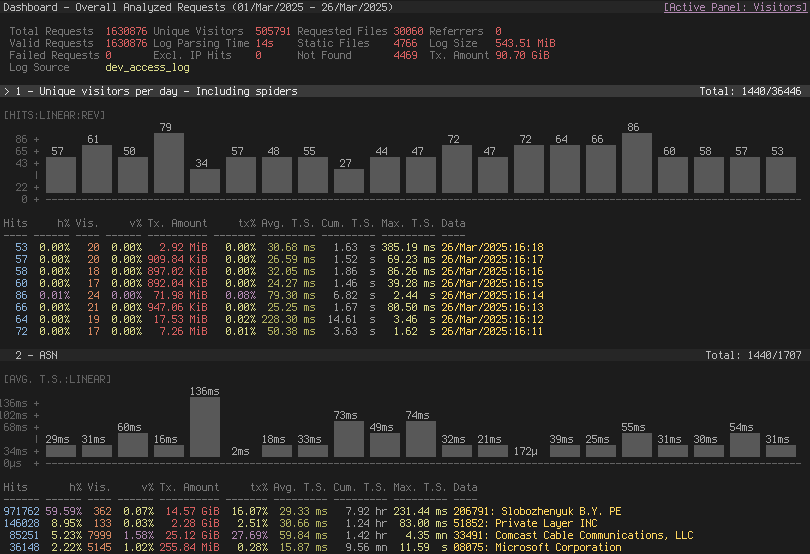
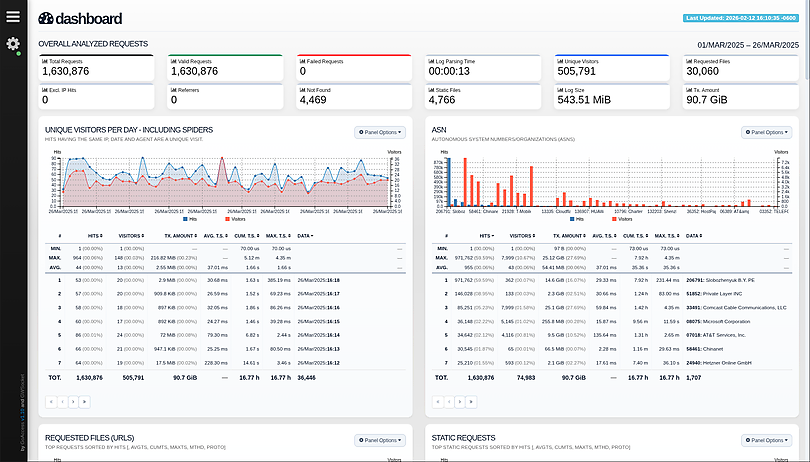
GoAccess is an open source, real-time web log analyzer and interactive viewer
that runs in a terminal on *nix systems or directly in your browser. Designed
with system administrators, DevOps engineers, and security professionals in
mind, it delivers fast, actionable HTTP statistics and visual server reports on
the fly. GoAccess parses your web server logs in real time and presents the
data directly in the terminal or via a live HTML dashboard, making it easy to
monitor traffic, detect anomalies, and troubleshoot issues instantly.
More info at: [https://goaccess.io](https://goaccess.io/?src=gh).
[](https://goaccess.io/)
[](https://rt.goaccess.io/?src=gh)
## Features ##
GoAccess parses the specified web log file and outputs the data to the X
terminal. Features include:
* **Completely Real Time**<br>
All panels and metrics are timed to be updated every 200 ms on the terminal
output and every second on the HTML output.
* **Minimal Configuration needed**<br>
You can just run it against your access log file, pick the log format and let
GoAccess parse the access log and show you the stats.
* **Track Application Response Time**<br>
Track the time taken to serve the request. Extremely useful if you want to
track pages that are slowing down your site.
* **WebSocket Authentication:**<br>
GoAccess offers enhanced WebSocket authentication, supporting local and
external JWT verification, with secure token refresh capabilities and seamless
integration with external authentication systems.
* **Nearly All Web Log Formats**<br>
GoAccess allows any custom log format string. Predefined options include,
Apache, Nginx, Amazon S3, Elastic Load Balancing, CloudFront, etc.
* **Incremental Log Processing**<br>
Need data persistence? GoAccess has the ability to process logs incrementally
through the on-disk persistence options.
* **Only one dependency**<br>
GoAccess is written in C. To run it, you only need ncurses as a dependency.
That's it. It even features its own Web Socket server — http://gwsocket.io/.
* **Visitors**<br>
Determine the amount of hits, visitors, bandwidth, and metrics for slowest
running requests by the hour, or date.
* **Metrics per Virtual Host**<br>
Have multiple Virtual Hosts (Server Blocks)? It features a panel that
displays which virtual host is consuming most of the web server resources.
* **ASN (Autonomous System Number mapping)**<br>
Great for detecting malicious traffic patterns and block them accordingly.
* **Color Scheme Customizable**<br>
Tailor GoAccess to suit your own color taste/schemes. Either through the
terminal, or by simply applying the stylesheet on the HTML output.
* **Support for Large Datasets**<br>
GoAccess features the ability to parse large logs due to its optimized
in-memory hash tables. It has very good memory usage and pretty good
performance. This storage has support for on-disk persistence as well.
* **Docker Support**<br>
Ability to build GoAccess' Docker image from upstream. You can still fully
configure it, by using Volume mapping and editing `goaccess.conf`. See
[Docker](https://github.com/allinurl/goaccess#docker) section below.
There is also documentation how to use [docker-compose](./docker-compose/README.md).
### Nearly all web log formats... ###
GoAccess allows any custom log format string. Predefined options include, but
not limited to:
* Amazon CloudFront standard logs (legacy fixed schema).
* Amazon Simple Storage Service (S3)
* AWS Elastic Load Balancing
* Combined Log Format (XLF/ELF) Apache | Nginx
* Common Log Format (CLF) Apache
* Google Cloud Storage.
* Apache virtual hosts
* Squid Native Format.
* W3C format (IIS).
* Caddy's JSON Structured format.
* Traefik's CLF flavor
## Why GoAccess? ##
GoAccess was designed to be a fast, terminal-based log analyzer. Its core idea
is to quickly analyze and view web server statistics in real time without
needing to use your browser (_great if you want to do a quick analysis of your
access log via SSH, or if you simply love working in the terminal_).
It also serves as a practical tool for security monitoring, making it easy to
spot suspicious activity, unusual traffic patterns, brute-force attempts,
scanners, bots, and anomalous requests directly from your logs.
While the terminal output is the default output, it has the capability to
generate a complete, self-contained, real-time [**`HTML`**](https://rt.goaccess.io/?src=gh)
report, as well as a [**`JSON`**](https://goaccess.io/json?src=gh), and
[**`CSV`**](https://goaccess.io/goaccess_csv_report.csv?src=gh) report.
You can see it more of a monitor command tool than anything else.
## Installation ##
<a href="https://repology.org/project/goaccess/versions">
<img src="https://repology.org/badge/vertical-allrepos/goaccess.svg" alt="Packaging status" align="right">
</a>
### Build from release
GoAccess can be compiled and used on *nix systems.
Download, extract and compile GoAccess with:
$ wget https://tar.goaccess.io/goaccess-1.11.tar.gz
$ tar -xzvf goaccess-1.11.tar.gz
$ cd goaccess-1.11/
$ ./configure --enable-utf8 --enable-geoip=mmdb --with-zlib
$ make
# make install
### Build from GitHub (Development) ###
$ git clone https://github.com/allinurl/goaccess.git
$ cd goaccess
$ autoreconf -fiv
$ ./configure --enable-utf8 --enable-geoip=mmdb
$ make
# make install
### Distributions ###
It is easiest to install GoAccess on GNU+Linux using the preferred package manager
of your GNU+Linux distribution. Please note that not all distributions will have
the latest version of GoAccess available.
#### Debian/Ubuntu ####
# apt-get install goaccess
**Note:** It is likely this will install an outdated version of GoAccess. To
make sure that you're running the latest stable version of GoAccess see
alternative option below.
#### Official GoAccess Debian & Ubuntu repository ####
$ wget -O - https://deb.goaccess.io/gnugpg.key | gpg --dearmor | sudo tee /usr/share/keyrings/goaccess.gpg >/dev/null
$ echo "deb [signed-by=/usr/share/keyrings/goaccess.gpg arch=$(dpkg --print-architecture)] https://deb.goaccess.io/ $(lsb_release -cs) main" | sudo tee /etc/apt/sources.list.d/goaccess.list
$ sudo apt-get update
$ sudo apt-get install goaccess
**Note**:
* `.deb` packages in the official repo are available through HTTPS as well. You may need to install `apt-transport-https`.
#### Fedora ####
# yum install goaccess
#### Arch ####
# pacman -S goaccess
#### Gentoo ####
# emerge net-analyzer/goaccess
#### OS X / Homebrew ####
# brew install goaccess
#### FreeBSD ####
# cd /usr/ports/sysutils/goaccess/ && make install clean
# pkg install sysutils/goaccess
#### OpenBSD ####
# cd /usr/ports/www/goaccess && make install clean
# pkg_add goaccess
#### openSUSE ####
# zypper ar -f obs://server:http http
# zypper in goaccess
#### OpenIndiana ####
# pkg install goaccess
#### pkgsrc (NetBSD, Solaris, SmartOS, ...) ####
# pkgin install goaccess
#### Windows ####
GoAccess can be used in Windows through Cygwin. See Cygwin's <a
href="https://goaccess.io/faq#installation">packages</a>. Or through the
GNU+Linux Subsystem on Windows 10.
#### Docker ####
A Docker image has been updated, capable of directing output from an access log. If you only want to output a report, you can pipe a log from the external environment to a Docker-based process:
touch report.html
cat access.log | docker run --rm -i -v ./report.html:/report.html -e LANG=$LANG allinurl/goaccess -a -o report.html --log-format COMBINED -
OR real-time
tail -F access.log | docker run -p 7890:7890 --rm -i -e LANG=$LANG allinurl/goaccess -a -o report.html --log-format COMBINED --real-time-html -
There is also documentation how to use [docker-compose](./docker-compose/README.md).
##### Build in isolated container
You can also build the binary for Debian based systems in an isolated container environment to prevent cluttering your local system with the development libraries:
$ curl -L "https://github.com/allinurl/goaccess/archive/refs/heads/master.tar.gz" | tar -xz && cd goaccess-master
$ docker build -t goaccess/build.debian-12 -f Dockerfile.debian-12 .
$ docker run -i --rm -v $PWD:/goaccess goaccess/build.debian-12 > goaccess
You can read more about using the docker image in [DOCKER.md](https://github.com/allinurl/goaccess/blob/master/DOCKER.md).
#### Distribution Packages ####
GoAccess has minimal requirements, it's written in C and requires only ncurses.
However, below is a table of some optional dependencies in some distros to
build GoAccess from source.
| Distro | NCurses | GeoIP (opt) | GeoIP2 (opt) | OpenSSL (opt) |
| ---------------------- | ---------------- | ---------------- | --------------------- | -------------------|
| **Ubuntu/Debian** | libncurses-dev | libgeoip-dev | libmaxminddb-dev | libssl-dev |
| **RHEL/CentOS** | ncurses-devel | geoip-devel | libmaxminddb-devel | openssl-devel |
| **Arch** | ncurses | geoip | libmaxminddb | openssl |
| **Gentoo** | sys-libs/ncurses | dev-libs/geoip | dev-libs/libmaxminddb | dev-libs/openssl |
| **Slackware** | ncurses | GeoIP | libmaxminddb | openssl |
**Note**: You may need to install build tools like `gcc`, `autoconf`,
`gettext`, `autopoint` etc. for compiling/building software from source. e.g.,
`base-devel`, `build-essential`, `"Development Tools"`.
## Storage ##
#### Default Hash Tables ####
In-memory storage provides better performance at the cost of limiting the
dataset size to the amount of available physical memory. GoAccess uses
in-memory hash tables. It has very good memory usage and pretty good
performance. This storage has support for on-disk persistence as well.
## Command Line / Config Options ##
See [**options**](https://goaccess.io/man#options) that can be supplied to the command or
specified in the configuration file. If specified in the configuration file, long
options need to be used without prepending `--`.
## Usage / Examples ##
**Note**: Piping data into GoAccess won't prompt a log/date/time
configuration dialog, you will need to previously define it in your
configuration file or in the command line.
### Getting Started ###
To output to a terminal and generate an interactive report:
# goaccess access.log
To generate an HTML report:
# goaccess access.log -a > report.html
To generate a JSON report file:
# goaccess access.log -a -d -o report.json
To generate a CSV report to stdout:
# goaccess access.log --no-csv-summary -o csv
GoAccess also allows great flexibility for real-time filtering and parsing. For
instance, to quickly diagnose issues by monitoring logs since goaccess was
started:
# tail -f access.log | goaccess -
And even better, to filter while maintaining opened a pipe to preserve
real-time analysis, we can make use of `tail -f` and a matching pattern tool
such as `grep`, `awk`, `sed`, etc.:
# tail -f access.log | grep -i --line-buffered 'firefox' | goaccess --log-format=COMBINED -
or to parse from the beginning of the file while maintaining the pipe opened
and applying a filter
# tail -f -n +0 access.log | grep -i --line-buffered 'firefox' | goaccess -o report.html --real-time-html -
### Multiple Log files ###
There are several ways to parse multiple logs with GoAccess. The simplest is to
pass multiple log files to the command line:
# goaccess access.log access.log.1
It's even possible to parse files from a pipe while reading regular files:
# cat access.log.2 | goaccess access.log access.log.1 -
**Note**: the single dash is appended to the command line to let GoAccess
know that it should read from the pipe.
Now if we want to add more flexibility to GoAccess, we can use `zcat --force`
to read compressed and uncompressed files. For instance, if we would
like to process all log files `access.log*`, we can do:
# zcat --force access.log* | goaccess -
_Note_: On Mac OS X, use `gunzip -c` instead of `zcat`.
### Multi-thread Support ###
Use `--jobs=<count>` (or `-j`) to enable multi-thread parsing. For example:
# goaccess access.log -o report.html -j 4
And use `--chunk-size=<256-32768>` to adjust chunk size, the default chunk size is 1024. For example:
# goaccess access.log -o report.html -j 4 --chunk-size=8192
### Real-time HTML outputs ###
GoAccess has the ability the output real-time data in the HTML report. You can
even email the HTML file since it is composed of a single file with no external
file dependencies, how neat is that!
The process of generating a real-time HTML report is very similar to the
process of creating a static report. Only `--real-time-html` is needed to make
it real-time.
The General panel displays `Total Requests / Req/s` while following live logs.
The request rate is sampled once per second from changes in Total Requests and
starts after the initial import, so historical parsing speed is not reported as
live traffic. `--html-refresh` controls how often those samples reach the
browser, not the sampling window itself.
# goaccess access.log -o /usr/share/nginx/html/your_site/report.html --real-time-html
To view the report you can navigate to `http://your_site/report.html`.
By default, GoAccess will use the host name of the generated report.
Optionally, you can specify the URL to which the client's browser will connect
to. See [FAQ](https://goaccess.io/faq) for a more detailed example.
# goaccess access.log -o report.html --real-time-html --ws-url=goaccess.io
By default, GoAccess listens on port 7890, to use a different port other than
7890, you can specify it as (make sure the port is opened):
# goaccess access.log -o report.html --real-time-html --port=9870
And to bind the WebSocket server to a different address other than 0.0.0.0, you
can specify it as:
# goaccess access.log -o report.html --real-time-html --addr=127.0.0.1
**Note**: To output real time data over a TLS/SSL connection, you need to use
`--ssl-cert=<cert.crt>` and `--ssl-key=<priv.key>`.
### Filtering ###
#### Working with dates ####
Another useful pipe would be filtering dates out of the web log
The following will get all HTTP requests starting on `05/Dec/2010` until the
end of the file.
# sed -n '/05\/Dec\/2010/,$ p' access.log | goaccess -a -
or using relative dates such as yesterdays or tomorrows day:
# sed -n '/'$(date '+%d\/%b\/%Y' -d '1 week ago')'/,$ p' access.log | goaccess -a -
If we want to parse only a certain time-frame from DATE a to DATE b, we can do:
# sed -n '/5\/Nov\/2010/,/5\/Dec\/2010/ p' access.log | goaccess -a -
If we want to preserve only certain amount of data and recycle storage, we can
keep only a certain number of days. For instance to keep & show the last 5
days:
# goaccess access.log --keep-last=5
#### Virtual hosts ####
Assuming your log contains the virtual host field. For instance:
vhost.io:80 8.8.4.4 - - [02/Mar/2016:08:14:04 -0600] "GET /shop HTTP/1.1" 200 615 "-" "Googlebot-Image/1.0"
And you would like to append the virtual host to the request in order to see
which virtual host the top urls belong to:
awk '$8=$1$8' access.log | goaccess -a -
To do the same, but also use real-time filtering and parsing:
tail -f access.log | unbuffer -p awk '$8=$1$8' | goaccess -a -
To exclude a list of virtual hosts you can do the following:
# grep -v "`cat exclude_vhost_list_file`" vhost_access.log | goaccess -
#### Files, status codes and bots ####
To parse specific pages, e.g., page views, `html`, `htm`, `php`, etc. within a
request:
# awk '$7~/\.html|\.htm|\.php/' access.log | goaccess -
Note, `$7` is the request field for the common and combined log format,
(without Virtual Host), if your log includes Virtual Host, then you probably
want to use `$8` instead. It's best to check which field you are shooting for,
e.g.:
# tail -10 access.log | awk '{print $8}'
Or to parse a specific status code, e.g., 500 (Internal Server Error):
# awk '$9~/500/' access.log | goaccess -
Or multiple status codes, e.g., all 3xx and 5xx:
# tail -f -n +0 access.log | awk '$9~/3[0-9]{2}|5[0-9]{2}/' | goaccess -o out.html -
And to get an estimated overview of how many bots (crawlers) are hitting your server:
# tail -F -n +0 access.log | grep -i --line-buffered 'bot' | goaccess -
### Tips ###
Also, it is worth pointing out that if we want to run GoAccess at lower
priority, we can run it as:
# nice -n 19 goaccess -f access.log -a
and if you don't want to install it on your server, you can still run it from
your local machine!
# ssh -n root@server 'tail -f /var/log/apache2/access.log' | goaccess - --log-format=COMBINED
**Note:** SSH requires `-n` so GoAccess can read from stdin. Also, make sure to
use SSH keys for authentication as it won't work if a passphrase is required.
#### Troubleshooting ####
We receive many questions and issues that have been answered previously.
* Date/time matching problems? Check that your log format and the system locale in which you run GoAccess match. See [#1571](https://github.com/allinurl/goaccess/issues/1571#issuecomment-543186858)
* Problems with pattern matching? Spaces are often a problem, see for instance [#136](https://github.com/allinurl/goaccess/issues/136), [#1579](https://github.com/allinurl/goaccess/issues/1579)
* Other issues matching log entries: See [>200 closed issues regarding log/date/time formats](https://github.com/allinurl/goaccess/issues?q=is%3Aissue+is%3Aclosed+label%3A%22log%2Fdate%2Ftime+format%22)
* Problems with log processing? See [>111 issues regarding log processing](https://github.com/allinurl/goaccess/issues?q=is%3Aissue+is%3Aclosed+label%3Alog-processing)
#### Incremental log processing ####
GoAccess has the ability to process logs incrementally through its internal
storage and dump its data to disk. It works in the following way:
1. A dataset must be persisted first with `--persist`, then the same dataset
can be loaded with.
2. `--restore`. If new data is passed (piped or through a log file), it will
append it to the original dataset.
The `--http-method` and `--http-protocol` settings must match those used to
create the database because they determine how request keys are grouped.
##### NOTES #####
GoAccess keeps track of inodes of all the files processed (assuming files will
stay on the same partition), in addition, it extracts a snippet of data from
the log along with the last line parsed of each file and the timestamp of the
last line parsed. e.g., `inode:29627417|line:20012|ts:20171231235059`
First, it compares if the snippet matches the log being parsed, if it does, it
assumes the log hasn't changed drastically, e.g., hasn't been truncated. If
the inode does not match the current file, it parses all lines. If the current
file matches the inode, it then reads the remaining lines and updates the count
of lines parsed and the timestamp. As an extra precaution, it won't parse log
lines with a timestamp ≤ than the one stored.
Piped data works based off the timestamp of the last line read. For instance,
it will parse and discard all incoming entries until it finds a timestamp >=
than the one stored.
##### Examples #####
// last month access log
# goaccess access.log.1 --persist
then, load it with
// append this month access log, and preserve new data
# goaccess access.log --restore --persist
To read persisted data only (without parsing new data)
# goaccess --restore
## Contributing ##
Any help on GoAccess is welcome. The most helpful way is to try it out and give
feedback. Feel free to use the GitHub issue tracker and pull requests to
discuss and submit code changes.
You can contribute to our translations by editing the .po files direct on GitHub or using the visual interface [inlang.com](https://inlang.com/editor/github.com/allinurl/goaccess)
Enjoy!
GoAccess 是一个开源的实时 Web 日志分析器和交互式查看器,可以在终端中运行,也可以生成 HTML 报告。它提供了快速、实时的 HTTP 统计信息,支持多种日志格式。
主要功能
- 实时分析:实时监控和分析 Web 日志
- 终端界面:提供交互式终端界面
- HTML 报告:可生成静态 HTML 报告
- 多种日志格式:支持 Apache、Nginx、Amazon S3、Elastic Load Balancing、CloudFront 等
- 自定义日志格式:支持自定义日志格式
- 地理位置:支持 IP 地理位置查询
- HTTP 状态码:详细的 HTTP 状态码统计
- 带宽统计:监控带宽使用情况
- 访问者分析:分析访问者来源和行为
- 搜索引擎:跟踪搜索引擎爬虫活动
部署要求
- 支持 Linux、macOS、FreeBSD、Solaris
- 内存占用小,性能高效
- 支持多种日志格式
- 可配置性强
- 支持实时分析
- 支持导出多种格式报告