
VoucherVault
Store and manage vouchers, coupons, loyalty and gift cards digitally. Supports expiry notifications, transaction histories, file uploads and OIDC SSO.
Store and manage vouchers, coupons, loyalty and gift cards digitally. Supports expiry notifications, transaction histories, file uploads and OIDC SSO.
<div align="center" width="100%">
<h1>VoucherVault</h1>
<img width="150px" src="myapp/static/assets/img/logo.svg">
<p>Django web application to store and manage vouchers, coupons, loyalty and gift cards digitally</p><p>
<a target="_blank" href="https://github.com/l4rm4nd"><img src="https://img.shields.io/badge/maintainer-LRVT-orange" /></a>
<a target="_blank" href="https://GitHub.com/l4rm4nd/VoucherVault/graphs/contributors/"><img src="https://img.shields.io/github/contributors/l4rm4nd/VoucherVault.svg" /></a>
<a target="_blank" href="https://github.com/PyCQA/bandit"><img src="https://img.shields.io/badge/security-bandit-yellow.svg"/></a><br>
<a target="_blank" href="https://GitHub.com/l4rm4nd/VoucherVault/commits/"><img src="https://img.shields.io/github/last-commit/l4rm4nd/VoucherVault.svg" /></a>
<a target="_blank" href="https://GitHub.com/l4rm4nd/VoucherVault/issues/"><img src="https://img.shields.io/github/issues/l4rm4nd/VoucherVault.svg" /></a>
<a target="_blank" href="https://github.com/l4rm4nd/VoucherVault/issues?q=is%3Aissue+is%3Aclosed"><img src="https://img.shields.io/github/issues-closed/l4rm4nd/VoucherVault.svg" /></a><br>
<a target="_blank" href="https://github.com/l4rm4nd/VoucherVault/stargazers"><img src="https://img.shields.io/github/stars/l4rm4nd/VoucherVault.svg?style=social&label=Star" /></a>
<a target="_blank" href="https://github.com/l4rm4nd/VoucherVault/network/members"><img src="https://img.shields.io/github/forks/l4rm4nd/VoucherVault.svg?style=social&label=Fork" /></a>
<a target="_blank" href="https://github.com/l4rm4nd/VoucherVault/watchers"><img src="https://img.shields.io/github/watchers/l4rm4nd/VoucherVault.svg?style=social&label=Watch" /></a><br>
<a target="_blank" href="https://hub.docker.com/r/l4rm4nd/vouchervault"><img src="https://badgen.net/badge/icon/l4rm4nd%2Fvouchervault:latest?icon=docker&label" /></a><br><p>
<a href="https://www.buymeacoffee.com/LRVT" target="_blank"><img src="https://www.buymeacoffee.com/assets/img/custom_images/orange_img.png" alt="Buy Me A Coffee" style="height: 41px !important;width: 174px !important;box-shadow: 0px 3px 2px 0px rgba(190, 190, 190, 0.5) !important;-webkit-box-shadow: 0px 3px 2px 0px rgba(190, 190, 190, 0.5) !important;" ></a>
</div>
## ⭐ Features
- User-friendly, mobile-optimized web portal with PWA support
- Manual offline mode with 48h caching supported
- Light and dark theme support
- Integration of vouchers, coupons, gift cards and loyalty cards
- Transaction history tracking (gift cards only)
- Item-specific file uploads (images and PDFs)
- Item sharing between users
- Display of redeem codes as QR codes or barcodes (many types supported)
- Client-side redeem code scanning (1D/2D) during item creation with automatic type detection using camera or file upload
- Expiry notifications via Apprise
- Multi-user support
- Multi-language support (English, German, French, Italian)
- Single Sign-On (SSO) via OIDC
- Database compatibility with SQLite3 and PostgreSQL
- REST API endpoint with stats for Home Assisstant (HA) and other dashboards
- Multi-currency support via free fixer.io API
## 📷 Screenshots
<details>
<img src="screenshots/dashboard.png">
<img src="screenshots/items.png">
<img src="screenshots/item-details.png">
</details>
## 🐳 Usage
[READ THE WIKI](https://github.com/l4rm4nd/VoucherVault/wiki/01-%E2%80%90-Installation) - [UNRAID SUPPORTED](https://github.com/l4rm4nd/VoucherVault/wiki/01-%E2%80%90-Installation#unraid-installation)
````
# create volume dir for persistence
mkdir -p ./volume-data/database
# adjust volume ownership to www-data
sudo chown -R 33:33 volume-data/*
# spawn the container stack
docker compose -f docker/docker-compose-sqlite.yml up -d
````
Once the container is up and running, you can access the web portal at http://127.0.0.1:8000.
The default username is `admin`. The default password is auto-generated. You can obtain the auto-generated password via the Docker container logs:
````
docker compose -f docker/docker-compose-sqlite.yml logs -f
````
> [!WARNING]
> The container runs as low-privileged `www-data` user with UID/GID `33`. So you have to adjust the permissions for the persistent database bind mount volume. A command like `sudo chown -R 33:33 <path-to-volume-data-dir>` should work. Afterwards, please restart the container.
> [!TIP]
> This repository follows the Conventional Commits standard. Therefore, you will find `patch`, `minor` and `major` release version tags on DockerHub.
> No one stops you from using the `latest` image tag but I recommend pinning a minor version series tag such as `1.30.x`.
>
> This is safer for automatic upgrades and you still get recent patches as well as bug fixes.
## 🌍 Environment Variables
The docker container takes various environment variables:
| Variable | Description | Default | Optional/Mandatory |
|----------------------------------|-----------------------------------------------------------------------------------------------------------------|----------------------------|---------------------|
| `DOMAIN` | Your Fully Qualified Domain Name (FQDN) or IP address. Used to define `ALLOWED_HOSTS` and `CSRF_TRUSTED_ORIGINS` for the Django framework. May define multiple ones by using a comma as delimiter. | `localhost` | Mandatory |
| `SECURE_COOKIES` | Set to `True` if you use a reverse proxy with TLS. Enables the `secure` cookie flag and `HSTS` HTTP response header. | `False` | Optional |
| `SESSION_EXPIRE_AT_BROWSER_CLOSE`| Set to `False` if you want to keep sessions valid after browser close. | `True` | Optional |
| `SESSION_COOKIE_AGE` | Define the maximum cookie age in minutes. | `30` | Optional |
| `EXPIRY_THRESHOLD_DAYS` | Defines the days prior item expiry when an Apprise expiry notification should be sent out. | `30` | Optional |
| `EXPIRY_LAST_NOTIFICATION_DAYS` | Defines the days prior item expiry when another final Apprise expiry notification should be sent out. | `7` | Optional |
| `TZ` | Defines the `TIME_ZONE` variable in Django's settings.py. | `Europe/Berlin` | Optional |
| `SECRET_KEY` | Defines a fixed secret key for the Django framework. If missing, a secure secret is auto-generated on the server-side each time the container starts. | `<auto-generated>` | Optional |
| `PORT` | Defines a custom port. Used to set `CSRF_TRUSTED_ORIGINS` in conjunction with the `DOMAIN` environment variable for the Django framework. Only necessary, if VoucherVault is operated on a different port than `8000`, `80` or `443`. | `8000` | Optional |
| `REDIS_URL` | Defines the Redis URL to use for Django-Celery-Beat task processing. | `redis://redis:6379/0` | Optional |
| `CSP_FRAME_ANCESTORS` | Comma-separated list of allowed sources for the CSP `frame-ancestors` directive. | `'none'` | Optional |
| `OIDC_ENABLED` | Set to `True` to enable OIDC authentication. | `False` | Optional |
| `OIDC_AUTOLOGIN` | Set to `True` if you want to automatically trigger OIDC flow on login page | `False` | Optional |
| `OIDC_CREATE_USER` | Set to `True` to allow the creation of new users through OIDC. | `True` | Optional |
| `OIDC_RP_SIGN_ALGO` | The signing algorithm used by the OIDC provider (e.g., RS256, HS256). | `HS256` | Optional |
| `OIDC_OP_JWKS_ENDPOINT` | URL of the JWKS endpoint for the OIDC provider. Mandatory if `RS256` signing algo is used. | `None` | Optional |
| `OIDC_RP_CLIENT_ID` | Client ID for your OIDC RP. | `None` | Optional |
| `OIDC_RP_CLIENT_SECRET` | Client secret for your OIDC RP. | `None` | Optional |
| `OIDC_OP_AUTHORIZATION_ENDPOINT` | Authorization endpoint URL of the OIDC provider. | `None` | Optional |
| `OIDC_OP_TOKEN_ENDPOINT` | Token endpoint URL of the OIDC provider. | `None` | Optional |
| `OIDC_OP_USER_ENDPOINT` | User info endpoint URL of the OIDC provider. | `None` | Optional |
| `DB_ENGINE` | Database engine to use (e.g., `postgres` for PostgreSQL or `sqlite3` for SQLite3). | `sqlite3` | Optional |
| `POSTGRES_HOST` | Hostname for the PostgreSQL database. | `db` | Optional |
| `POSTGRES_PORT` | Port number for the PostgreSQL database. | `5432` | Optional |
| `POSTGRES_USER` | PostgreSQL database user. | `vouchervault` | Optional |
| `POSTGRES_PASSWORD` | PostgreSQL database password. | `vouchervault` | Optional |
| `POSTGRES_DB` | PostgreSQL database name. | `vouchervault` | Optional |
| `CELERY_WORKER_CONCURRENCY` | Celery worker concurrency. | `1` | Optional |
| `CELERY_WORKER_PREFETCH_MULTIPLIER` | Celery worker prefetch multiplier. | `1` | Optional |
| `DEBUG` | Enable HTTP debug logging. | `False` | Optional |
You can find detailed instructions on how to setup OIDC SSO in the [wiki](https://github.com/l4rm4nd/VoucherVault/wiki/02-%E2%80%90-Authentication#oidc-authentication).
## 🔔 Notifications
Notifications are handled by [Apprise](https://github.com/caronc/apprise). May read the [wiki](https://github.com/l4rm4nd/VoucherVault/wiki/03-%E2%80%90-Notifications).
You can define custom Apprise URLs in the user profile settings. The input form takes a single or a comma-separated list of multiple Apprise URLs.
The interval, how often items are checked against a potential expiry, is pre-defined (daily at 9AM) in the Django admin area. Here, we are utilizing Django-Celery-Beat + a Redis instance for periodic task execution.
An item will trigger an expiry notification if the expiry date is within the number of days defined by the environment variable `EXPIRY_THRESHOLD_DAYS`. By default, this threshold is set to 30 days. Additionally, a final reminder is sent out another time if the item expires within the next 7 days.
## 🔐 Multi-User Setup
VoucherVault is initialized with a default superuser account named `admin` and a secure auto-generated password.
This administrative account has full privileges to the Django admin panel, located at `/admin`.
Therefore, all database model entries can be read and modified by this user. Additionally, new user accounts and groups can be freely created too.
Finally, Single-Sign-On (SSO) via OIDC is supported. Check out the environment variables above as well as the [wiki](https://github.com/l4rm4nd/VoucherVault/wiki/02-%E2%80%90-Authentication#oidc-authentication).
## 💾 Backups
All application data is stored within a Docker bind mount volume.
This volume is defined in the example Docker Compose files given. The default location is defined as `./volume-data/database`.
Therefore, by backing up this bind mount volume, all your application data is saved.
> [!WARNING]
> Read the official [SQLite3 documentation](https://sqlite.org/backup.html) or [PostgreSQL documentation](https://www.postgresql.org/docs/current/backup.html) regarding backups.
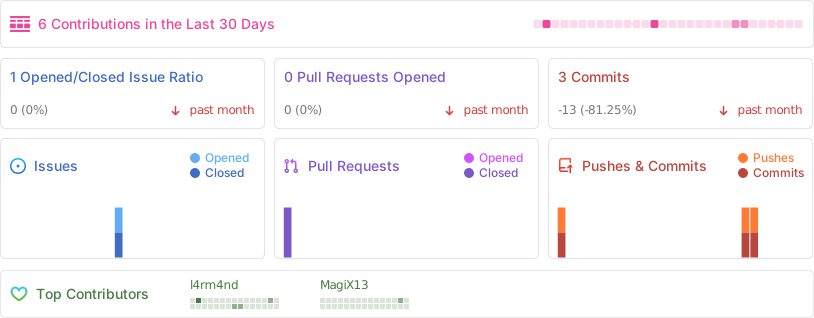
## 🤖 Repo Statistics
Personal finances platform (web + REST API + Android) that'll help you budget, keep track of your income/spending and forecast your financial future.
Local-first personal finance tool based on zero-sum budgeting, supporting synchronization across devices, custom rules, manual transaction importing (from QIF, OFX, and QFX files), and optional automatic synchronization with many banks.
Financial accounting and inventory management software for small to medium businesses.