
Seatsurfing
Webbased app to book seats, desks and rooms for offices.
Webbased app to book seats, desks and rooms for offices.
# Seatsurfing
[](https://github.com/seatsurfing/seatsurfing/releases)
[](https://github.com/seatsurfing/seatsurfing/releases)
[](https://github.com/seatsurfing/seatsurfing/actions)
[](https://github.com/seatsurfing/seatsurfing/blob/main/LICENSE)
## 🚀 Seatsurfing SaaS available!
We offer [Seatsurfing](https://seatsurfing.io/) as a fully-hosted Software-as-a-Service (SaaS). [Start for free now](https://seatsurfing.io/sign-up)!
- **No installation required** - Get started immediately
- **Get it free** - Free for up to 10 users
- **Automatic updates** - Always enjoy the latest features
- **Managed infrastructure** - Servers in Germany (EU)
- **30 days free trail for Professional plan** - [Start free trial](https://seatsurfing.io/sign-up?paid)!
If you prefer to self host, but want additional functionality, check out our [Plus Plugin](https://seatsurfing.io/docs/self-hosted/plus-plugin).
## 🔗 Integrations
- **[Microsoft Teams](https://appsource.microsoft.com/en-us/product/office/WA200008773)**
- **[Atlassian Confluence](https://marketplace.atlassian.com/apps/1224242)** (Cloud-only feature)
## 📖 Introduction
Seatsurfing is a software which enables your organization's employees to book seats, desks and rooms.
This repository contains the Backend, which consists of:
- The Server (REST API Backend) written in Go
- User Self-Service Booking Web Interface ("Booking UI"), built as a Progressive Web Application (PWA) which can be installed on mobile devices
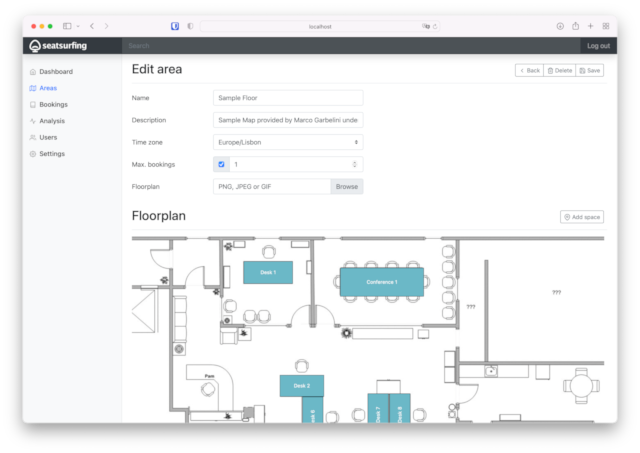
- Admin Web Interface ("Admin UI")
- Common TypeScript files for the two TypeScript/React web frontends
**[Visit project's website for more information.](https://seatsurfing.io)**
## 📷 Screenshots
### Web Admin UI
### Web Booking UI

## 🗸 Quick reference
- **Maintained by:** [seatsurfing.io](https://seatsurfing.io/)
- **Where to get help:** [Documentation](https://seatsurfing.io/docs/)
- **Docker architectures:** [amd64, arm64](https://github.com/seatsurfing/seatsurfing/pkgs/container/backend)
- **License:** [GPL 3.0](https://github.com/seatsurfing/seatsurfing/blob/main/LICENSE)
## 🐋 How to use the Docker image
### Start using Docker Compose
```
services:
server:
image: ghcr.io/seatsurfing/backend
restart: always
networks:
sql:
ports:
- 8080:8080
environment:
POSTGRES_URL: 'postgres://seatsurfing:DB_PASSWORD@db/seatsurfing?sslmode=disable'
# CRYPT_KEY is used for encrypting sensitive data in the database
CRYPT_KEY: 'some-random-32-bytes-long-string'
# When running without a reverse proxy taking care of TLS termination,
# use the following settings which enable HTTP on port 8080
PUBLIC_SCHEME: 'http'
PUBLIC_PORT: '8080'
db:
image: postgres:17
restart: always
networks:
sql:
volumes:
- db:/var/lib/postgresql/data
environment:
POSTGRES_PASSWORD: DB_PASSWORD
POSTGRES_USER: seatsurfing
POSTGRES_DB: seatsurfing
volumes:
db:
networks:
sql:
```
This starts …
- … a PostgreSQL database with data stored on Docker volume "db"
- … a Seatsurfing instance with port 8080 exposed
The Seatsurfing Booking UI is accessible at :8080/ui/search/ and the Seatsurfing Admin UI instance at :8080/ui/admin/.
To login, use the default admin login (user `admin@seatsurfing.local` and password `Sea!surf1ng`) or set the [environment variables](https://seatsurfing.io/docs/self-hosted/config) `INIT_ORG_USER` and `INIT_ORG_PASS` to customize the admin login.
### Running on Kubernetes
Please refer to our [Kubernetes documentation](https://seatsurfing.io/docs/self-hosted/kubernetes/).
## ⚙️ Environment variables
Please check out the [documentation](https://seatsurfing.io/docs/self-hosted/config) for information on available environment variables and further guidance.
**Hint**: When running in an IPV6-only Docker/Podman environment with multiple network interfaces bound to the Frontend containers, setting the `LISTEN_ADDR` environment variable can be necessary as NextJS binds to only one network interface by default. Set it to `::` to bind to any address.