
PiGallery 2
A directory-first photo gallery website, with a rich UI, optimised for running on low resource servers.
# PiGallery2  [](https://coveralls.io/github/bpatrik/pigallery2?branch=master) [](https://github.com/bpatrik/pigallery2/actions) [](https://github.com/sponsors/bpatrik) [](https://ko-fi.com/pigallery2) A fast, directory-first, self-hosted photo gallery, built for low-resource servers like the Raspberry Pi. Point it at your photo folder and browse it as it is: PiGallery2 never modifies your photos. [Documentation](https://bpatrik.github.io/pigallery2/) · [Live demo](https://pigallery2.onrender.com/) (the demo server sleeps when idle, so the first load may take up to 60 seconds)  ## 🚀 Key features - **⚡ Fast**: optimized for low-end hardware. - **✔️ Simple**: point it to your photos and you are ready. - **📁 Directory-first**: shows your folder structure as it is. - **🔒 Read-only**: your photo folder is never modified. Map, search, sharing, albums, faces and more: see the [full feature list](https://bpatrik.github.io/pigallery2/features). ## 🏁 Getting started Docker is the supported way to run PiGallery2 (`amd64` and `arm64v8` images): ```bash docker run -d -p 80:80 \ -v <config folder>:/app/data/config \ -v <db folder>:/app/data/db \ -v <photos folder>:/app/data/images:ro \ -v <temp folder>:/app/data/tmp \ bpatrik/pigallery2:latest ``` Then open `http://localhost`, log in with `admin` / `admin` and change the password in the settings. PiGallery2 does not rate limit requests itself, so put a reverse proxy in front of it before you expose it to the internet. The [Docker guide](https://bpatrik.github.io/pigallery2/setup/docker) has a docker-compose setup with nginx and HTTPS. A [native install](https://bpatrik.github.io/pigallery2/setup/direct-install) is possible, but not supported. ## 📖 Documentation - [Features](https://bpatrik.github.io/pigallery2/features) - [FAQ](https://bpatrik.github.io/pigallery2/faq) - [Configuration](https://bpatrik.github.io/pigallery2/user-guide/configuration) - [User rights](https://bpatrik.github.io/pigallery2/user-guide/user-rights) ## 📱 Apps & 3rd party tools - **Install it as an app**: PiGallery2 is a PWA, so you can install it on your phone as it is (browser menu -> *Add to Home screen*). - **[Extensions](extension/REPOSITORY.md)**: community extensions that you can install from the settings page. - **[Native Android app](https://github.com/dasmaetthes/pigallery2_android)**: a community-made Android (and Android TV) client. 3rd party tools are not maintained by me, and I take no responsibility for them. [More details](https://bpatrik.github.io/pigallery2/third-party). ## 🤝 Contributing Bug fixes are welcome. I mostly merge bug fixes: to keep the app simple, a new feature should be a setting, a theme or an [extension](https://bpatrik.github.io/pigallery2/development/extensions) when possible. Please read the [contribution guide](https://bpatrik.github.io/pigallery2/development/contributing) before you start. Using an AI coding agent? See [AGENTS.md](AGENTS.md). ## ❤️ Support PiGallery2 is free, and I build it alone in my free time, which, since my daughter was born, mostly means nap time 👶. WebStorm and AI coding agents help me make the most of those short windows. If PiGallery2 makes your photos a bit nicer to browse, consider ❤️ [sponsoring me on GitHub](https://github.com/sponsors/bpatrik) or ☕ [buying me a coffee on Ko-fi](https://ko-fi.com/pigallery2). A coffee is plenty, and pizza or a date night with my wife is even better 🍕. ## Star history [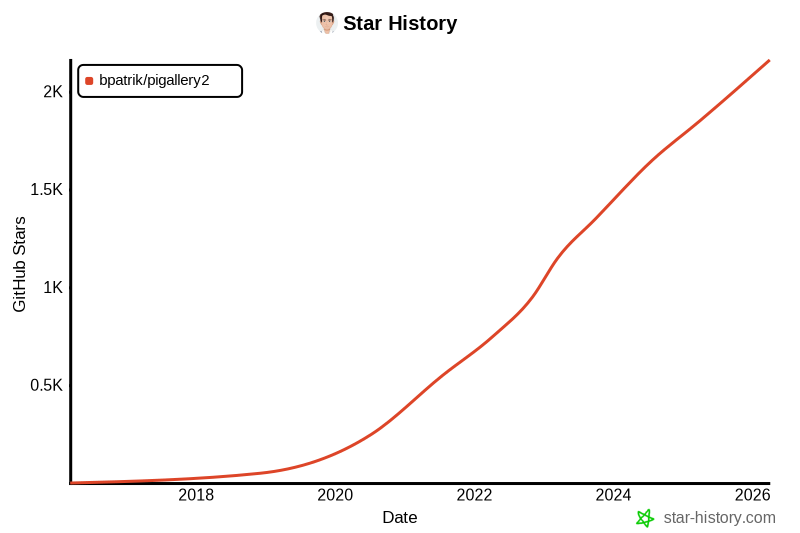](https://www.star-history.com/#bpatrik/pigallery2&type=date&legend=top-left) ## License [MIT](LICENSE)
Browse personal photos and videos featuring tagging, mobile-friendly, and AI powered image discovery.
Photo management service with a slight focus on cool graphs (alternative to Google Photos).
Aggregates images taken this week, from previous years and presents them on a web page with a simple slideshow.