
Matchering
Automated music mastering (alternative to LANDR, eMastered, and MajorDecibel).
Automated music mastering (alternative to LANDR, eMastered, and MajorDecibel).
[](https://t.me/tribute/app?startapp=de85)

[](https://pypi.python.org/pypi/matchering/)
[](https://badge.fury.io/py/matchering)
[](https://pypi.python.org/pypi/matchering/)
[](https://github.com/vinta/awesome-python)
[](https://github.com/psf/black)
## Matching + Mastering = ❤️
**[Matchering 2.0]** is a novel **[Containerized Web Application](#docker-image)**, **[Python Library][PyPI]**, and **[ComfyUI Node](#comfyui-node)** for audio matching and [mastering].
🔥 Also integrated in the **[UVR5 Desktop App](https://ultimatevocalremover.com/)**!
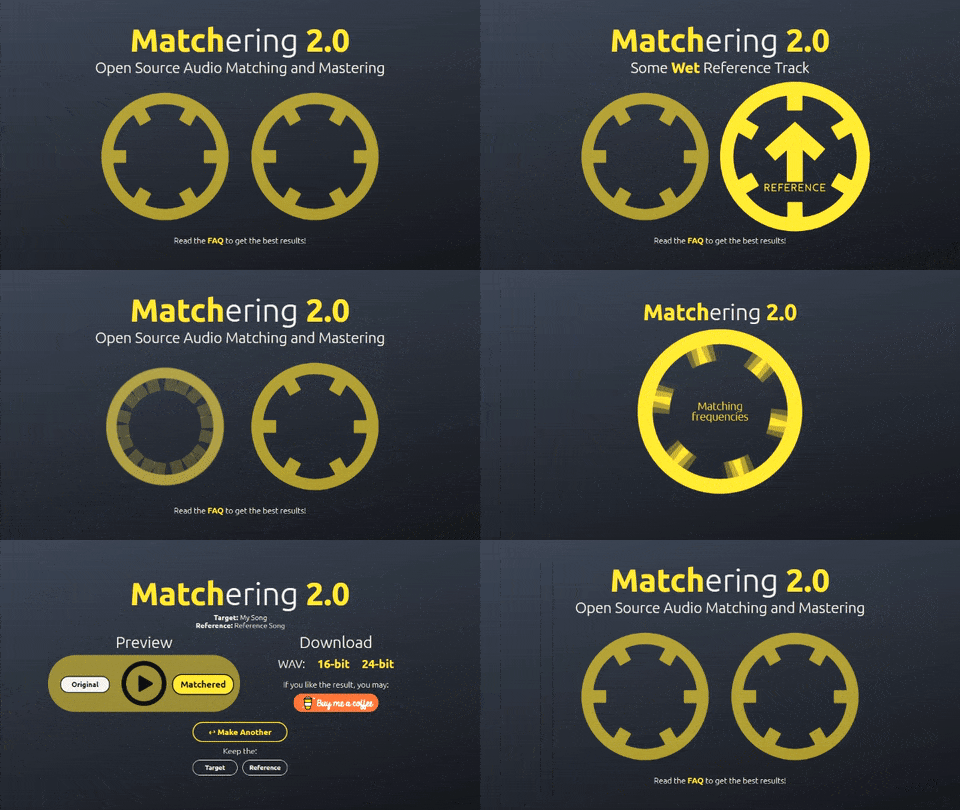
It follows a *simple idea* - you take TWO audio files and feed them into **Matchering**:
- **TARGET** (the track you want to master, you want it to sound like the reference)
- **REFERENCE** (another track, like some kind of "wet" popular song, you want your target to sound like it)
Our algorithm matches both of these tracks and provides you the mastered **TARGET** track with the same [RMS], [FR], [peak amplitude] and [stereo width] as the **REFERENCE** track has.
🔥 **[Benn Jordan Matchering review][BennVideo]**:
> - ***Matchering 2.0 beating all other AI's**! (note: by carefully selecting a proper song as reference)*
> - *Ranking it no.3 (out of 12) right behind 2 professional master engineers*
> - *Seems a rock-solid study with 472 judged entries*
>
> *(Thanks to [@bascurtiz](https://github.com/bascurtiz) for [the find](https://github.com/sergree/matchering/issues/59))*
[][BennVideo]
You can try out **Matchering** yourself without having to install it, thanks to the hosting provided by **[Songmastr](https://www.songmastr.com/)**, **[MVSEP](https://mvsep.com/)** and **[Moises](https://moises.ai/)**.
Watch **[the video][Video]**:
[][Video]
So **Matchering 2.0** will make your song sound the way you want! It opens up a wide range of opportunities:
- You can make your music instantly sound like your favorite artist's music
- You can make all the tracks on your new album sound the same very quickly
- You can find new aspects of your sound in experiments
- You can do everything as you want! Because of **[Your References, Your Rules.™](https://macprovideo.com/article/audio-software/sound-tools-instant-online-mastering-with-reference-matching-now-in-open-beta)** *(just a little nostalgic note)* 🤭
> Differences from the previous major version:
> - Completely rewritten in [Python 3], based on open source tech stack (no more [MATLAB])
> - Our own open source [Hyrax] [brickwall limiter] was implemented for it
> - Processing speed and accuracy have been increased
> - Now it is [the library][PyPI] that can be connected to **everything** in **the Python world**
If you are looking for a **Matchering paper**, you can read **[this Habr article](https://habr.com/ru/post/709120/)**.
# Installation and Usage
If you are a music producer or an audio engineer, choose the **[Desktop App](#desktop-app---the-easiest-way)** or **[ComfyUI Node](#comfyui-node)**.
If you are an AI mastering startup, choose the **[Docker Image](#docker-image)**.
If you are a developer, choose the **[Python Library](#python-library---for-developers)**.
# Desktop App - The Easiest Way
### [NEW! Matchering @ UVR5 Desktop App](https://ultimatevocalremover.com/)
You can find Matchering under `Choose Process Method > Audio Tools & Choose Audio Tool > Matchering`.
### [Or try WITHOUT Installation](https://www.youtube.com/watch?v=Aw0nH6QqAck)
# ComfyUI Node
### [ComfyUI-Matchering](https://github.com/MuziekMagie/ComfyUI-Matchering)
# Docker Image
### [Windows](https://github.com/sergree/matchering/blob/master/DOCKER_WINDOWS.md)
### [macOS](https://github.com/sergree/matchering/blob/master/DOCKER_MACOS.md)
### [Linux](https://github.com/sergree/matchering/blob/master/DOCKER_LINUX.md)
## Updating
If you need to update the version of the installed **Docker Image**, follow **[these instructions](https://github.com/sergree/matchering/blob/master/DOCKER_UPDATING.md)**.
# Python Library - For Developers
## Installation
**4 GB RAM machine with [Python 3.8.0 or higher][Python 3] is required**
### libsndfile
**Matchering 2.0** depends on the **[SoundFile]** library, which depends on the system library **[libsndfile]**. On Windows and macOS, it installs automatically. On Linux, you need to install **[libsndfile]** using your distribution's package manager, for example:
```sudo apt update && sudo apt -y install libsndfile1```
### python3-pip
On some Linux distributions, **python3-pip** is not installed by default. For example use this command on Ubuntu Linux to fix this:
```sudo apt -y install python3-pip```
### Matchering Python Package
Finally, install our `matchering` package:
```
# Linux / macOS
python3 -m pip install -U matchering
# Windows
python -m pip install -U matchering
```
### *(Optional) FFmpeg*
If you would like to enable *MP3 loading support*, you need to install the **[FFmpeg][FFmpeg]** library. For example use this command on Ubuntu Linux:
```sudo apt -y install ffmpeg```
Or follow these instructions: [Windows][FFmpeg-win], [macOS][FFmpeg-mac].
## Quick Example
```python
import matchering as mg
# Sending all log messages to the default print function
# Just delete the following line to work silently
mg.log(print)
mg.process(
# The track you want to master
target="my_song.wav",
# Some "wet" reference track
reference="some_popular_song.wav",
# Where and how to save your results
results=[
mg.pcm16("my_song_master_16bit.wav"),
mg.pcm24("my_song_master_24bit.wav"),
],
)
```
You can find more examples in the **[examples directory]**.
### Or you can use premade **Matchering 2.0 Command Line Application**: **[matchering-cli]**.
### Or its enhanced fork: **[kubinka0505/matchering-cli]**.
## 💓 WhatBPM
Looking for the perfect BPM or key for a new EDM track?
**[Check out WhatBPM!](https://sergree.github.io/whatbpm)**
A completely free open-source web service from the author of Matchering.
## A Coffee
If our package saved your time or money, you may:
[](https://t.me/tribute/app?startapp=de85)
**Thank you!**
## Links
- [Press About Us](https://github.com/sergree/matchering/blob/master/PRESS.md)
- [Supporters](https://github.com/sergree/matchering/blob/master/SUPPORTERS.md)
- [Our Limiter Quality Test](https://github.com/sergree/matchering/blob/master/LIMITER_TEST.md)
- [Matchering Hyrax Limiter JSFX clone by Tokyo Dawn Labs](https://github.com/JClones/JSFXClones/blob/master/JClones_Hyrax.md)
- [Log Codes Overview](https://github.com/sergree/matchering/blob/master/LOG_CODES.md)
- [Our Thoughts](https://github.com/sergree/matchering/blob/master/THOUGHTS.md)
[Matchering]: https://github.com/sergree/matchering
[Matchering 2.0]: https://github.com/sergree/matchering
[Hyrax]: https://github.com/sergree/matchering/tree/master/matchering/limiter
[mastering]: https://en.wikipedia.org/wiki/Audio_mastering
[RMS]: https://en.wikipedia.org/wiki/Root_mean_square
[FR]: https://en.wikipedia.org/wiki/Frequency_response
[peak amplitude]: https://en.wikipedia.org/wiki/Amplitude
[stereo width]: https://en.wikipedia.org/wiki/Stereo_imaging
[MATLAB]: https://www.mathworks.com/products/matlab.html
[Python 3]: https://www.python.org/
[brickwall limiter]: https://en.wikipedia.org/wiki/Dynamic_range_compression#Limiting
[PyPI]: https://pypi.org/project/matchering
[SoundFile]: https://github.com/bastibe/SoundFile#installation
[libsndfile]: http://www.mega-nerd.com/libsndfile/
[FFmpeg]: https://www.ffmpeg.org/download.html
[FFmpeg-win]: https://video.stackexchange.com/questions/20495/how-do-i-set-up-and-use-ffmpeg-in-windows
[FFmpeg-mac]: https://superuser.com/questions/624561/install-ffmpeg-on-os-x
[matchering-cli]: https://github.com/sergree/matchering-cli
[kubinka0505/matchering-cli]: https://github.com/kubinka0505/matchering-cli
[examples directory]: https://github.com/sergree/matchering/tree/master/examples
[Video]: http://www.youtube.com/watch?v=8Su5STDYfcA "Matchering 2.0 - Open Source Audio Matching and Mastering"
[BennVideo]: https://www.youtube.com/watch?v=wZRV2H4PK0Q "Benn Jordan Matchering 2.0 Review"
Track pricing, stock status of products across multiple stores such as Amazon, Ebay, Walmart, etc.
Push notifications to NTFY when a new release is available on Docker Hub or Github.
No-code business automation tool like Zapier or Tray. For example, you can send a Slack notification for each new Trello card.
Platform to programmatically author, schedule, and monitor workflows.
Business automation tool that lets you connect different services like Twitter, Slack, and more to automate your business processes (alternative to Zapier).