
Komga
Media server for comics/mangas/BDs with API and OPDS support, a modern web interface for exploring your libraries, as well as a web reader.
Media server for comics/mangas/BDs with API and OPDS support, a modern web interface for exploring your libraries, as well as a web reader.
[](https://opencollective.com/komga) [](https://github.com/sponsors/gotson) [](https://discord.gg/TdRpkDu) [](https://github.com/gotson/komga/actions?query=workflow%3ATests+branch%3Amaster) [](https://github.com/gotson/komga/releases) [](https://github.com/gotson/komga/releases) [](https://hub.docker.com/r/gotson/komga) [](https://hosted.weblate.org/engage/komga/) #  Komga Komga is a media server for your comics, mangas, BDs, magazines and eBooks. #### Chat on [Discord](https://discord.gg/TdRpkDu) ## Features - Browse libraries, series and books via a responsive web UI that works on desktop, tablets and phones - Organize your library with collections and read lists - Edit metadata for your series and books - Import embedded metadata automatically - Webreader with multiple reading modes - Manage multiple users, with per-library access control, age restrictions, and labels restrictions - Offers a REST API, many community tools and scripts can interact with Komga - OPDS v1 and v2 support - Kobo Sync with your Kobo eReader - KOReader Sync - Download book files, whole series, or read lists - Duplicate files detection - Duplicate pages detection and removal - Import books from outside your libraries directly into your series folder - Import ComicRack `cbl` read lists ## Installation Refer to the [website](https://komga.org/docs/category/installation) for instructions. ## Documentation Head over to our [website](https://komga.org) for more information. ## Develop in Komga Check the [development guidelines](./DEVELOPING.md). ## Translation [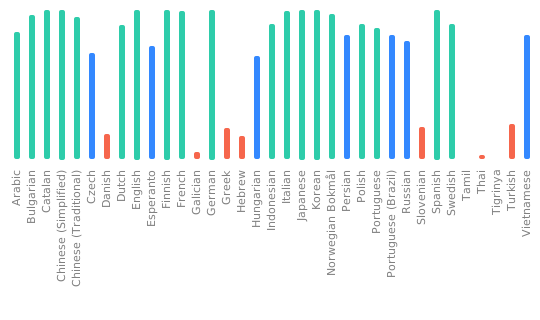](https://hosted.weblate.org/engage/komga/) ## Powered by [](https://www.jetbrains.com/?from=Komga) Thanks to [JetBrains](https://www.jetbrains.com/?from=Komga) for providing the development environment that helps us develop Komga. [](https://www.chromatic.com) Thanks to [Chromatic](https://www.chromatic.com/) for providing the visual testing platform that helps us review UI changes and catch visual regressions. ## Credits The Komga icon is based on an icon made by [Freepik](https://www.freepik.com/home) from www.flaticon.com
Developer-friendly API to interact with powerful tools like Chromium and LibreOffice for converting numerous document formats (HTML, Markdown, Word, Excel, etc.) into PDF files, and more.
Local hosted web application that allows you to perform various operations on PDF files, such as merging, splitting, file conversions and OCR.