
go-doxy
Lightweight, simple, and performant reverse proxy with WebUI, Docker integration, automatic shutdown/startup for container based on traffic.
Lightweight, simple, and performant reverse proxy with WebUI, Docker integration, automatic shutdown/startup for container based on traffic.
<div align="center">
<img src="assets/godoxy.png" width="200">
[](https://sonarcloud.io/summary/new_code?id=yusing_go-proxy)

[](https://sonarcloud.io/summary/new_code?id=go-proxy)

[](https://discord.gg/umReR62nRd)
A lightweight, simple, and performant reverse proxy with WebUI.
<h5>
<a href="https://docs.godoxy.dev">Website</a> | <a href="https://docs.godoxy.dev/Home.html">Wiki</a> | <a href="https://discord.gg/umReR62nRd">Discord</a>
</h5>
<h5>EN | <a href="README_CHS.md">简体中文</a> | <a href="README_CHT.md">繁體中文</a></h5>
<img src="screenshots/webui.jpg" style="max-width: 650">
Have questions? Ask [ChatGPT](https://chatgpt.com/g/g-6825390374b481919ad482f2e48936a1-godoxy-assistant)! (Thanks to [@ismesid](https://github.com/arevindh))
</div>
## Running demo
<https://demo.godoxy.dev>
## Quick start
Configure Wildcard DNS Record(s) to point to machine running `GoDoxy`, e.g.
- A Record: `*.domain.com` -> `10.0.10.1`
- AAAA Record (if you use IPv6): `*.domain.com` -> `::ffff:a00:a01`
> [!NOTE]
> GoDoxy is designed to be running in `host` network mode, do not change it.
>
> To change listening ports, modify `.env`.
1. Prepare a new directory for Docker Compose and config files.
2. Run setup script inside the directory, or [set up manually](#manual-setup)
```shell
/bin/sh -c "$(curl -fsSL https://raw.githubusercontent.com/yusing/godoxy/main/scripts/setup.sh)"
```
3. Start the docker compose service from generated `compose.yml`:
```shell
docker compose up -d
```
4. You may now do some extra configuration on WebUI `https://godoxy.yourdomain.com`
## Key features
- **Simple setup**
- Configure routes with [Docker labels or route files](https://docs.godoxy.dev/Docker-labels-and-Route-Files)
- Manage routes, config, containers, logs, metrics, and uptime from the WebUI
- Use [multi-node Docker setups](https://docs.godoxy.dev/Configurations#multi-docker-nodes-setup)
- **Automatic routing**
- Discover Docker and Podman containers
- Hot-reload config and container state changes
- Manage Let's Encrypt certificates with [DNS-01 providers](https://docs.godoxy.dev/DNS-01-Providers)
- **Traffic management**
- HTTP reverse proxy
- TCP/UDP port forwarding
- OpenID Connect SSO
- ForwardAuth integration, e.g. TinyAuth
- [HTTP middlewares](https://docs.godoxy.dev/Middlewares)
- [Custom error pages](https://docs.godoxy.dev/Custom-Error-Pages)
- **Access control**
- IP/CIDR rules
- Country and timezone rules with a MaxMind account
- Access logging
- Periodic access summaries
- **Idle sleep**
- Stop and wake Docker containers based on traffic
- Stop and wake Proxmox LXC containers based on traffic
- **Proxmox integration**
- Bind routes automatically to nodes or LXC containers
- Start, stop, and restart LXC containers from the WebUI
- Stream node and LXC logs through WebSocket
- **Platform support**
- Linux amd64
- Linux arm64
## How GoDoxy works
1. List all the containers
2. Read container name, labels, and port configurations for each of them
3. Create a route if applicable (a route is like a "Virtual Host" in NPM)
4. Watch for container / config changes and update automatically
> [!NOTE]
> GoDoxy uses the label `proxy.aliases` as the subdomain(s), if unset it defaults to the `container_name` field in docker compose.
>
> For example, with the label `proxy.aliases: qbt` you can access your app via `qbt.domain.com`.
## Screenshots
### idlesleeper

### Metrics and Logs
<div align="center">
<table>
<tr>
<td align="center"><img src="screenshots/routes.jpg" alt="Routes" width="350"/></td>
<td align="center"><img src="screenshots/servers.jpg" alt="Servers" width="350"/></td>
</tr>
<tr>
<td align="center"><b>Routes</b></td>
<td align="center"><b>Servers</b></td>
</tr>
</table>
</div>
## Proxmox Integration
GoDoxy can automatically discover and manage Proxmox nodes and LXC containers through configured providers.
### Automatic Route Binding
Routes are automatically linked to Proxmox resources through reverse lookup:
1. **Node-level routes** (VMID = 0): When hostname, IP, or alias matches a Proxmox node name or IP
2. **Container-level routes** (VMID > 0): When hostname, IP, or alias matches an LXC container
This enables seamless proxy configuration without manual binding:
```yaml
routes:
pve-node-01:
host: pve-node-01.internal
port: 8006
# Automatically links to Proxmox node pve-node-01
```
### WebUI Management
From the WebUI, you can:
- **LXC Lifecycle Control**: Start, stop, restart containers
- **Node Logs**: Stream real-time journalctl or log files output from nodes
- **LXC Logs**: Stream real-time journalctl or log files output from containers
## Update / uninstall system agent
Installer supports both systemd and Alpine/OpenRC (`rc-service`) hosts.
Update:
```bash
sh -c "$(curl -fsSL https://github.com/yusing/godoxy/raw/refs/heads/main/scripts/install-agent.sh)" -- update
```
Uninstall:
```bash
sh -c "$(curl -fsSL https://github.com/yusing/godoxy/raw/refs/heads/main/scripts/install-agent.sh)" -- uninstall
```
## Manual Setup
1. Make `config` directory then grab `config.example.yml` into `config/config.yml`
`mkdir -p config && wget https://raw.githubusercontent.com/yusing/godoxy/main/config.example.yml -O config/config.yml`
2. Grab `.env.example` into `.env`
`wget https://raw.githubusercontent.com/yusing/godoxy/main/.env.example -O .env`
3. Grab `compose.example.yml` into `compose.yml`
`wget https://raw.githubusercontent.com/yusing/godoxy/main/compose.example.yml -O compose.yml`
### Folder structure
```shell
├── certs
│ ├── cert.crt
│ └── priv.key
├── compose.yml
├── config
│ ├── config.yml
│ ├── middlewares
│ │ ├── middleware1.yml
│ │ ├── middleware2.yml
│ ├── provider1.yml
│ └── provider2.yml
├── data
│ ├── metrics # metrics data
│ │ ├── uptime.json
│ │ └── system_info.json
└── .env
```
## Build from source
1. Clone the repository `git clone https://github.com/yusing/godoxy --depth=1`
2. Install / Upgrade [go (>=1.22)](https://go.dev/doc/install) and [`shadowtree`](https://github.com/yusing/shadowtree) if not already
3. Clear cache if you have built this before (go < 1.22) with `go clean -cache`
4. Get dependencies with `shadowtree mod-tidy`
5. Build binary with `shadowtree build`
## Star History
[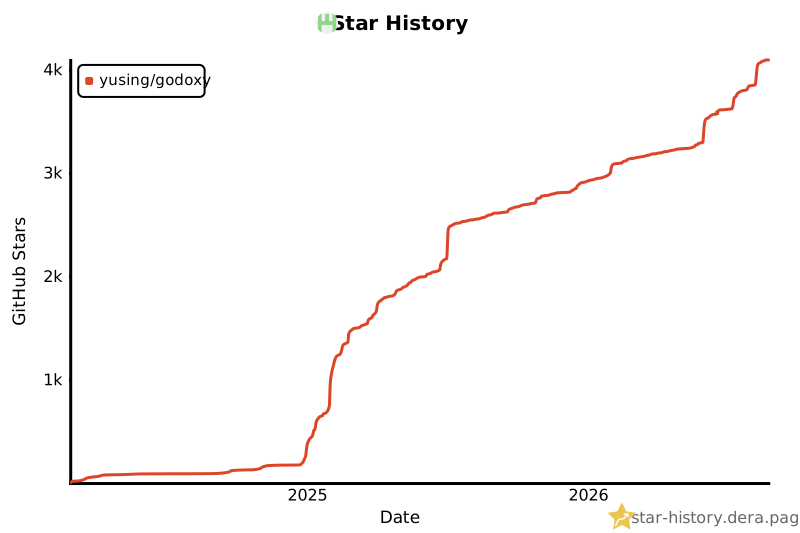](https://star-history.dera.page/#yusing/godoxy&Date)
Small self-contained pure-Go web server with Lua, Markdown, HTTP/2, QUIC, Redis and PostgreSQL support.
Powerful, enterprise-ready, open source web server with automatic HTTPS.
Docker container for managing Nginx proxy hosts with a simple, powerful interface.
Cross-platform, high-performance, and asynchronous web server for static file serving.
Web application accelerator/caching HTTP reverse proxy.