
CNCjs
Web interface for CNC milling controllers running Grbl, Smoothieware, or TinyG.
Web interface for CNC milling controllers running Grbl, Smoothieware, or TinyG.
# CNCjs [](#backers) [](#sponsors) [](https://travis-ci.org/cncjs/cncjs) [](https://ci.appveyor.com/project/cheton/cncjs) [](https://coveralls.io/github/cncjs/cncjs?branch=master)
[](https://www.npmjs.com/package/cncjs)

CNCjs is a full-featured web-based interface for CNC controllers running [Grbl](https://github.com/grbl/grbl), [Marlin](https://github.com/MarlinFirmware/Marlin), [Smoothieware](https://github.com/Smoothieware/Smoothieware), or [TinyG](https://github.com/synthetos/TinyG).
For a more complete introduction, see the [Introduction](https://github.com/cncjs/cncjs/wiki/Introduction) section of the wiki page.

## Features
* Supported controllers
- [Grbl](https://github.com/gnea/grbl) ([Download](https://github.com/gnea/grbl/releases))
- [Grbl-Mega](https://github.com/gnea/grbl-Mega) ([Download](https://github.com/gnea/grbl-Mega/releases))
- [Marlin](https://github.com/MarlinFirmware/Marlin) ([Download](http://marlinfw.org/meta/download/))
- [Smoothieware](https://github.com/Smoothieware/Smoothieware) ([Download](https://github.com/Smoothieware/Smoothieware/tree/edge/FirmwareBin))
- [TinyG](https://github.com/synthetos/TinyG) (_Recommend: firmware version 0.97 build 449.xx_) ([Download](http://synthetos.github.io/))
- [g2core](https://github.com/synthetos/g2)
* [Desktop App for Linux, Mac OS X, and Windows](https://github.com/cncjs/cncjs/wiki/Desktop-App)
* 6-axis digital readout (DRO)
* Tool path 3D visualization
* Simultaneously communicate with multiple clients
* Responsive view for small screen display with device width less than 720px
- <i>Safari on an iPhone 5S</i> [\[1\]](https://cloud.githubusercontent.com/assets/447801/15633749/b817cd4a-25e7-11e6-9beb-600c65ea1324.PNG) [\[2\]](https://cloud.githubusercontent.com/assets/447801/15633750/b819b5f6-25e7-11e6-8bfe-d3e6247e443b.PNG)
* Customizable workspace
* [Custom widget](https://github.com/cncjs/cncjs-widget-boilerplate) (since 1.9.10)
* Custom MDI (Multiple Document Interface) command buttons (since 1.9.13)
* My Account
* Commands
* Events
* [Keyboard Shortcuts](https://cnc.js.org/docs/user-guide/#keyboard-shortcuts)
* [Contour ShuttleXpress](https://cnc.js.org/docs/user-guide/#contour-shuttlexpress)
* Multi-Language Support
* Watch Directory
* [Tool Change](https://github.com/cncjs/cncjs/wiki/Tool-Change) (since 1.9.11)
* Z-Probe
## Custom Widgets
* [cncjs-widget-boilerplate](https://github.com/cncjs/cncjs-widget-boilerplate) - Creating custom widgets for CNCjs.
## Pendants
### Boilerplate Code
* [cncjs-pendant-boilerplate](https://github.com/cncjs/cncjs-pendant-boilerplate) - A bare minimum example to develop a cncjs pendant.
### Existing Pendants
* [cncjs-pendant-keyboard](https://github.com/cncjs/cncjs-pendant-keyboard) - A simple pendant (using wireless keyboard or usb) to CNCJS.
* [cncjs-pendant-numpad](https://github.com/mariolukas/cncjs-pendant-numpad) - A simple pendant (using wireless numpad or usb) to CNCJS.
* [cncjs-pendant-lcd](https://github.com/cncjs/cncjs-pendant-lcd) - CNCjs Web Kiosk for Raspberry Pi Touch Displays.
* [cncjs-pendant-ps3](https://github.com/cncjs/cncjs-pendant-ps3) - Dual Shock / PS3 Bluetooth Remote Pendant for CNCjs.
* [cncjs-pendant-raspi-gpio](https://github.com/cncjs/cncjs-pendant-raspi-gpio) - Simple Raspberry Pi GPIO Pendant control for CNCjs.
* [cncjs-pendant-alexa](https://github.com/thcasssio/cncjs-pendant-alexa) - Voice jog control via a custom Alexa skill ("Alexa, ask mill x plus 20"), with per-axis travel limits and state-gated jogging.
## Tablet UI
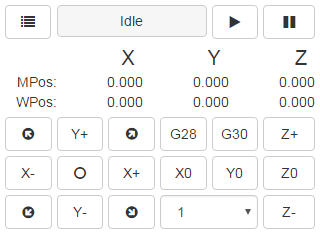
* [cncjs-pendant-tinyweb](https://github.com/cncjs/cncjs-pendant-tinyweb) - A tiny web console for small 320x240 LCD display.<br>
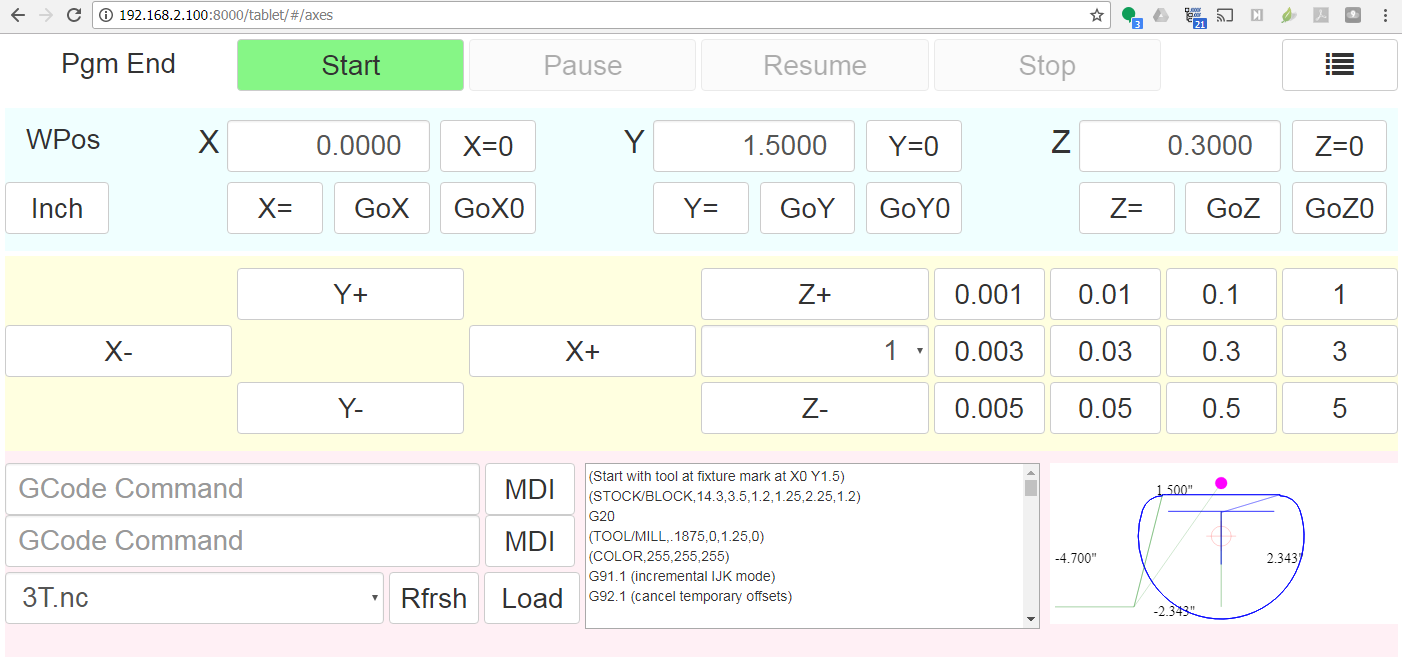
* [cncjs-shopfloor-tablet](https://github.com/cncjs/cncjs-shopfloor-tablet) - A simplified UI for cncjs optimized for tablet computers in a production (shop floor) environment.<br>
## Browser Support
<br>Chrome | <br>Edge | <br>Firefox | <br>IE | <br>Opera | <br>Safari
--- | --- | --- | --- | --- | --- |
Yes | Yes | Yes| Not supported | Yes | Yes |
## Supported Node.js Versions
| Version | Supported Level |
| :------ |:--------------- |
| <= 10 | Not supported |
| 12 | Supported |
| >= 14 | Recommended |
## Getting Started
### Node.js Installation
Node.js 14 or higher is recommended. You can install [Node Version Manager](https://github.com/creationix/nvm) to manage multiple Node.js versions. If you have `git` installed, just clone the `nvm` repo, and check out the latest version:
```
git clone https://github.com/creationix/nvm.git ~/.nvm
cd ~/.nvm
git checkout `git describe --abbrev=0 --tags`
cd ..
. ~/.nvm/nvm.sh
```
Add these lines to your `~/.bash_profile`, `~/.bashrc`, or `~/.profile` file to have it automatically sourced upon login:
```bash
export NVM_DIR="$HOME/.nvm"
[ -s "$NVM_DIR/nvm.sh" ] && . "$NVM_DIR/nvm.sh" # This loads nvm
```
Once installed, you can select Node.js versions with:
```
nvm install 14
nvm use 14
```
It's also recommended that you upgrade npm to the latest version. To upgrade, run:
```
npm install npm@latest -g
```
### Installation
Install cncjs as a non-root user, or the [serialport](https://github.com/node-serialport/node-serialport) module may not install correctly on some platforms like Raspberry Pi.
```
npm install -g cncjs
```
If you're going to use sudo or root to install cncjs, you need to specify the `--unsafe-perm` option to run npm as the root account.
```
sudo npm install --unsafe-perm -g cncjs
```
Check out [https://github.com/cncjs/cncjs/wiki/Installation](https://github.com/cncjs/cncjs/wiki/Installation) for other installation methods.
### Upgrade
Run `npm install -g cncjs@latest` to install the latest version. To determine the version, use `cncjs --version`.
### Usage
Run `cncjs` to start the server, and visit `http://yourhostname:8000/` to view the web interface. Pass `--help` to `cncjs` for more options.
```
pi@rpi3$ cncjs -h
Usage: cncjs [options]
Options:
--version output the version number
-p, --port <port> Set listen port (default: 8000)
-H, --host <host> Set listen address or hostname (default: 0.0.0.0)
-b, --backlog <backlog> Set listen backlog (default: 511)
-c, --config <filename> Set config file (default: ~/.cncrc)
-v, --verbose Increase the verbosity level (-v, -vv, -vvv)
-m, --mount <route-path>:<target> Add a mount point for serving static files
-w, --watch-directory <path> Watch a directory for changes
--access-token-lifetime <lifetime> Access token lifetime in seconds or a time span string (default: 30d)
--allow-remote-access Allow remote access to the server (default: false)
--controller <type> Specify CNC controller: Grbl|Marlin|Smoothie|TinyG|g2core (default: '')
-h, --help output usage information
Examples:
$ cncjs -vv
$ cncjs --mount /pendant:/home/pi/tinyweb
$ cncjs --mount /widget:~+/widget --mount /pendant:~/pendant
$ cncjs --mount /widget:https://cncjs.github.io/cncjs-widget-boilerplate/v1/
$ cncjs --watch-directory /home/pi/watch
$ cncjs --access-token-lifetime 60d # e.g. 3600, 30m, 12h, 30d
$ cncjs --allow-remote-access
$ cncjs --controller Grbl
```
Instead of passing command line options for `--watch-directory`, `--access-token-lifetime`, `--allow-remote-access`, and `--controller`, you can create a `~/.cncrc` file that contains the following configuration in JSON format:
```json
{
"mountPoints": [
{
"route": "/pendant",
"target": "/home/pi/tinyweb"
},
{
"route": "/widget",
"target": "https://cncjs.github.io/cncjs-widget-boilerplate/v1/"
}
],
"watchDirectory": "/path/to/dir",
"accessTokenLifetime": "30d",
"allowRemoteAccess": false,
"controller": ""
}
```
To troubleshoot issues, run:
```
cncjs -vvv
```
### Configuration File
The configuration file <b>.cncrc</b> contains settings that are equivalent to the cncjs command-line options. The configuration file is stored in user's home directory. To find out the actual location of the home directory, do the following:
* Linux/Mac
```sh
echo $HOME
```
* Windows
```sh
echo %USERPROFILE%
```
Check out an example configuration file [here](https://github.com/cncjs/cncjs/blob/master/examples/.cncrc).
### File Format
See https://github.com/cncjs/cncjs/issues/242#issuecomment-352294549 for a detailed explanation.
```json
{
"ports": [
{
"path": "/dev/ttyAMA0",
"manufacturer": ""
}
],
"baudrates": [115200, 250000],
"mountPoints": [
{
"route": "/widget",
"target": "https://cncjs.github.io/cncjs-widget-boilerplate/v1/"
}
],
"watchDirectory": "/path/to/dir",
"accessTokenLifetime": "30d",
"allowRemoteAccess": false,
"controller": "",
"state": {
"checkForUpdates": true,
"controller": {
"exception": {
"ignoreErrors": false
}
}
},
"commands": [
{
"title": "Update (root user)",
"commands": "sudo npm install -g cncjs@latest --unsafe-perm; pkill -f cncjs"
},
{
"title": "Update (non-root user)",
"commands": "npm install -g cncjs@latest; pkill -f cncjs"
},
{
"title": "Reboot",
"commands": "sudo /sbin/reboot"
},
{
"title": "Shutdown",
"commands": "sudo /sbin/shutdown"
}
],
"events": [],
"macros": [],
"users": []
}
```
## Documentation
https://cnc.js.org/docs/
## Examples
There are several *.gcode files in the [examples](https://github.com/cncjs/cncjs/tree/master/examples) directory. You can use the GCode widget to load a GCode file and make a trial run.
If you don't have a CAM software, try using [jscut](http://jscut.org/) to create G-Code from *.svg. It's a simple CAM package that runs in the browser.
Check out a live demo at http://jscut.org/jscut.html.
## Contributions
Use [GitHub issues](https://github.com/cncjs/cncjs/issues) for requests.
Pull requests welcome! Learn how to [contribute](CONTRIBUTING.md).
## Localization
You can help translate resource files in both of [app](https://github.com/cncjs/cncjs/tree/master/src/app/i18n) and [server](https://github.com/cncjs/cncjs/tree/master/src/server/i18n) directories from English to other languages. Check out [Localization guide](https://github.com/cncjs/cncjs/blob/master/CONTRIBUTING.md#localization) to learn how to get started. If you are not familiar with GitHub development, you can [open an issue](https://github.com/cncjs/cncjs/issues) or send your translations to cheton@gmail.com.
Locale | Language | Status | Contributors
:----- | :------- | :----- | :-----------
[cs](https://github.com/cncjs/cncjs/tree/master/src/app/i18n/cs) | Čeština (Czech) | ✔ | [Miroslav Zuzelka](https://github.com/dronecz)
[de](https://github.com/cncjs/cncjs/tree/master/src/app/i18n/de) | Deutsch (German) | ✔ | [Thorsten Godau](https://github.com/dl9sec), [Max B.](https://github.com/mbs38)
[es](https://github.com/cncjs/cncjs/tree/master/src/app/i18n/es) | Español (Spanish) | ✔ | [Juan Biondi](https://github.com/yeyeto2788), [hasecilu](https://github.com/hasecilu)
[fr](https://github.com/cncjs/cncjs/tree/master/src/app/i18n/fr) | Français (French) | ✔ | [Simon Maillard](https://github.com/maisim), [CorentinBrulé](https://github.com/CorentinBrule)
[hu](https://github.com/cncjs/cncjs/tree/master/src/app/i18n/hu) | Magyar (Hungarian) | ✔ | Sipos Péter
[it](https://github.com/cncjs/cncjs/tree/master/src/app/i18n/it) | Italiano (Italian) | ✔ | [vince87](https://github.com/vince87)
[ja](https://github.com/cncjs/cncjs/tree/master/src/app/i18n/ja) | 日本語 (Japanese) | ✔ | [Naoki Okamoto](https://github.com/toonaoki)
[nb](https://github.com/cncjs/cncjs/tree/master/src/app/i18n/nb) | Norsk (Norwegian) | ✔ | [Stian Kristensen](https://github.com/stianfk)
[nl](https://github.com/cncjs/cncjs/tree/master/src/app/i18n/nl) | Nederlands (Netherlands) | ✔ | [dutchpatriot](https://github.com/dutchpatriot)
[pt](https://github.com/cncjs/cncjs/tree/master/src/app/i18n/pt) | Português (Portugal) | ✔ | [Cheton Wu](https://github.com/cheton)
[pt-br](https://github.com/cncjs/cncjs/tree/master/src/app/i18n/pt-br) | Português (Brasil) | ✔ | [cmsteinBR](https://github.com/cmsteinBR)
[ru](https://github.com/cncjs/cncjs/tree/master/src/app/i18n/ru) | Ру́сский (Russian) | ✔ | [Denis Yusupov](https://github.com/minithc)
[uk](https://github.com/cncjs/cncjs/tree/master/src/app/i18n/uk) | українська (Ukrainian) | ✔ | [khvalera](https://github.com/khvalera)
[tr](https://github.com/cncjs/cncjs/tree/master/src/app/i18n/tr) | Türkçe (Turkish) | ✔ | Ali GÜNDOĞDU
[zh-cn](https://github.com/cncjs/cncjs/tree/master/src/app/i18n/zh-cn) | 简体中文 (Simplified Chinese) | ✔ | [Mandy Chien](https://github.com/MandyChien), [Terry Lee](https://github.com/TerryShampoo)
[zh-tw](https://github.com/cncjs/cncjs/tree/master/src/app/i18n/zh-tw) | 繁體中文 (Traditional Chinese) | ✔ | [Cheton Wu](https://github.com/cheton)
## Donate
If you would like to support this project, you can make a donation using PayPal. Thank you!
[](https://www.paypal.com/cgi-bin/webscr?cmd=_s-xclick&hosted_button_id=38CYN33CWPBR2)
## Contributors
This project exists thanks to all the people who contribute. [[Contribute](CONTRIBUTING.md)].
<a href="graphs/contributors"><img src="https://opencollective.com/cncjs/contributors.svg?width=890&button=false" /></a>
## Backers
Thank you to all our backers! 🙏 [[Become a backer](https://opencollective.com/cncjs#backer)]
<a href="https://opencollective.com/cncjs#backers" target="_blank"><img src="https://opencollective.com/cncjs/backers.svg?width=890"></a>
## Sponsors
Support this project by becoming a sponsor. Your logo will show up here with a link to your website. [[Become a sponsor](https://opencollective.com/cncjs#sponsor)]
<a href="https://opencollective.com/cncjs/sponsor/0/website" target="_blank"><img src="https://opencollective.com/cncjs/sponsor/0/avatar.svg"></a>
<a href="https://opencollective.com/cncjs/sponsor/1/website" target="_blank"><img src="https://opencollective.com/cncjs/sponsor/1/avatar.svg"></a>
<a href="https://opencollective.com/cncjs/sponsor/2/website" target="_blank"><img src="https://opencollective.com/cncjs/sponsor/2/avatar.svg"></a>
<a href="https://opencollective.com/cncjs/sponsor/3/website" target="_blank"><img src="https://opencollective.com/cncjs/sponsor/3/avatar.svg"></a>
<a href="https://opencollective.com/cncjs/sponsor/4/website" target="_blank"><img src="https://opencollective.com/cncjs/sponsor/4/avatar.svg"></a>
<a href="https://opencollective.com/cncjs/sponsor/5/website" target="_blank"><img src="https://opencollective.com/cncjs/sponsor/5/avatar.svg"></a>
<a href="https://opencollective.com/cncjs/sponsor/6/website" target="_blank"><img src="https://opencollective.com/cncjs/sponsor/6/avatar.svg"></a>
<a href="https://opencollective.com/cncjs/sponsor/7/website" target="_blank"><img src="https://opencollective.com/cncjs/sponsor/7/avatar.svg"></a>
<a href="https://opencollective.com/cncjs/sponsor/8/website" target="_blank"><img src="https://opencollective.com/cncjs/sponsor/8/avatar.svg"></a>
<a href="https://opencollective.com/cncjs/sponsor/9/website" target="_blank"><img src="https://opencollective.com/cncjs/sponsor/9/avatar.svg"></a>
## License
Licensed under the [MIT License](https://raw.githubusercontent.com/cncjs/cncjs/master/LICENSE).
Digital asset manager for 3d print files; STL, OBJ, 3MF and more.
Straightforward realtime kanban boards management for intuitive task tracking. Featuring an elegant dark mode, collapsible todo lists, and multitasking tools to supercharge your team's productivity.
Local-first personal finance tool based on zero-sum budgeting, supporting synchronization across devices, custom rules, manual transaction importing (from QIF, OFX, and QFX files), and optional automatic synchronization with many banks.
CMS with a focus on extensible in-context editing tools.